Goal
We want to share our tips and advice on how bots and scanners can be detected by validating their HTTP headers
Audience
Red Team
Blue Team
Security Researchers
Server Administrators
Software Developers
IoC
Not applicable
Disclaimer
This article is written for educational purposes and is intended only for legal penetration testing and red teaming activities, where explicit permission has been granted. If you wish to test any of the scripts provided, refer to the disclaimer.
In the first deep dive of this blog series, we want first want to explore how bots behave and what steps we can take to detect them. Not only by using JavaScript-based methods, but also by blocking them server-side before they even hit our application. While we are researching this subject to better protect our offensive infrastructure, almost everything we’ve found is applicable in defensive strategies as well. However, because we are mostly dealing with a limited scope of targets, we can be a bit more strict in “dropping” traffic with a risk of losing potentially “valuable” visitors.
So, how are we going to recognize those pesky bots and crawlers? For starters, we’re going to dissect HTTP requests and try to determine who is what in this post.
Bots and their communication style
It’s obvious that bots aren’t the same as regular users. But how can we identify whether a person is legitimately browsing your web application, or whether you’re being scanned by an automated tool?
Based on our research, there are several indicators that can be used to identify this and luckily, it goes beyond just the User-Agent.
User-agent
The User-Agent header remains an important indicator. While this field cannot be trusted when it is correct, it’s interesting to see how many applications or bots use an outdated or suspicious User-Agent header. This makes them easier to spot and potentially blockable before they can reach our web application.
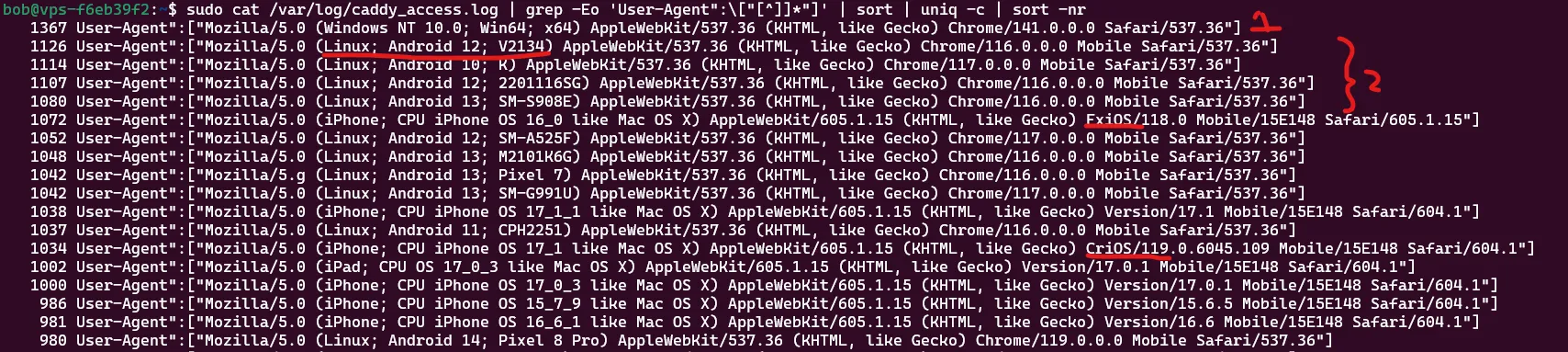
Lots of request use old browser versions.
We see that the most frequently sent request come from a Chrome browser who are quite up to date, with version 141. However, what’s interesting is that many requests are coming from user agents using Chrome 116 and 117, which were released in August 2023.
We’re seeing the same pattern for FxIOS (Firefox for iOS) and CriOS (Chrome for iOS). That’s a signal worth paying attention to: when a significant portion of your traffic claims to use older browser versions, it might indicate automated tools or scripted traffic rather than real users. There are also some issues with the first part of the user-agent string, but we’ll get to that in a second.
When people use tools or software to scan or interact with websites, they sometimes forget that they can (or should) update or customize the User-Agent header. On top of that, you’ll occasionally be hit by “regular” bots as well, such as Googlebot, which can also be seen at position 2 in the image below.
List of regular bots and tools.
So here come our first two, and most basic, tactics that we could implement:
Does the User-Agent look like a normal browser User-Agent header?
Does the User-Agent indicate that the browser version is reasonably up to date?
The first tactic means we check whether there is a clear reference to a browser like Chrome, Edge, or Firefox that we can extract using a regular expression. The second tactic means we look for the browser version and extract it using regex. It should be at least compliant with the latest few versions. In our case, everything prior to version 140 is considered old. Version 140 was released on 2 September.
Just by performing these two checks and filtering for User-Agent strings from version 140 or higher, we already see a massive change. Out of 38,132 requests made to one of our testing websites, only 2,016 come from these more recent browsers.
17,588 requests didn’t have any reference to a browser at all.
Another 18,521 had a browser version older than 140.
Those are some serious cuts already!
Of course, bots, adversaries and analysts can easily spoof HTTP headers, and the User-Agent is no exception. Still, it can be a useful indicator if you only want regular browsers to access your website.
If we look at the Statcounter data for the Netherlands, we see that Google Chrome is the main browser, followed by Safari, then Firefox, and apparently also Samsung Internet. So these are the browsers we could be testing for.
User-Agent reduction
But user agents aren’t what they used to be anymore. More and more browsers and providers are aiming to minimize the amount of information that is leaked with each request. Previously, the user agent could reveal a lot about a person: their OS, OS version, device model, and precise browser version.
This information is no longer sent by default. That’s because of User-Agent Reduction, an initiative to reduce the amount of privacy-sensitive information included in the user agent string. Mozilla gives a great explanation in this article.
If you’ve read the Mozilla documentation, you’ll have seen a list of agreed-upon user agents that are now used. Instead of sending full platform details, certain parts are now hardcoded or generalized. The list on mozilla.org includes:
However, as of September 2025, iOS will also apply user-agent reduction. For example, the OS version in the user agent is now fixed to 18_7 for both Firefox and Safari on iOS.
When we verify how many times this reduced user-agent format is not used, we also see a significant decrease in “workable” items.
Here you can see not everybody uses user-agent reduction yet.
This especially has a big impact on bots pretending to be iOS devices. In our dataset, that leads to an almost 98.7% reduction in such cases:
Percentage reduction = 1871⁄1895 × 100 ≈ 98.7%
In other words, only a very small fraction of traffic claiming to be iOS still passes this user-agent reduction check, which makes it a strong signal for detecting suspicious or automated requests.
Here you can see clearly that IOS is just recently implementing user-agent reduction.
Client Hints
Because user agents used to leak a lot of information, and because of the reductions that were implemented, some browsers still wanted to offer a way to expose this data, but only when explicitly requested. This is where Client Hints come in.
With Client Hints, a browser can send additional HTTP headers that describe the device and environment. And there are quite a lot of them. They can tell you, for example:
Whether the user is on a mobile device or tablet.
Dark or light mode preferences.
Platform and version information.
CPU architecture, device memory, and more.
In other words, you can now request much of the information that was originally baked into the User-Agent header via dedicated headers instead. Not all browsers support these Client Hints. They are mainly available in Chromium-based browsers, and even within that group there are differences. For example, Brave sends less information than Chrome or Edge.
For detecting bots, however, Client Hints are a valuable resource at least for the (many) clients using Chromium-based browsers.
Sec-Fetch-* headers
In recent years, all major browsers have started supporting the Sec-Fetch-* HTTP headers, which indicate where a request is coming from and how it was initiated. There are three standard headers:
sec-fetch-dest
sec-fetch-mode
sec-fetch-site
These have a set of standard values that depend on whether your website is requesting data from itself, from third parties, or being embedded elsewhere. Validating that these headers are present and contain plausible values for the type of request is another useful signal for distinguishing between real browsers and bots.
When we look at our traffic, only a fraction of the requests actually send these headers along, which already helps to narrow down the pool of likely legitimate browser traffic.
Only this check alone would result in a cleanup of approximately 96.03% of the requests.
Percentage reduction = 62782⁄65380 × 100 ≈ 96.03%
Sec-CH-Device-Memory
One additional Client Hint is the Sec-CH-Device-Memory header. It gives an indication of how much RAM (in GB) is available to the client application. This value is capped at a maximum of 8.
To reduce costs, it’s common for automation bots to run in containers, pods, or virtual machines with limited resources. That often means they’ll report less memory than a typical end-user device. If you consistently see values lower than 8 for supposedly “normal” desktop traffic, this can be an indicator that you’re dealing with automated clients.
Here you can see three possible Device memories that are used. 1 and 2 are high indicators of bot use
Sec-CH-UA
With the User-Agent header now providing limited information, there is another header that gives us some insight into the client we’re dealing with: Sec-CH-UA. This header tells us whether we’re working with a Chromium-based browser and, if so, which one. That alone can provide some clear indicators.
For a normal browser that supports Sec-CH-UA (all Chromium-based browsers do), we usually receive:
A Chromium engine version.
A browser brand and version (e.g. "Google Chrome" or "Microsoft Edge").
The typical "Not;A=Brand" entry.
Sometimes only the Chromium version is present, without a recognizable browser brand like Chrome, Brave, or Edge. That can indicate that a non-standard client or automation tool is being used, which is a potential sign of bot traffic.
Another strong signal, just like with the original User-Agent header, is the mention of HeadlessChrome. Seeing this in Sec-CH-UA is a clear indicator that an (unpatched) crawler or headless browser is hitting your systems.
A small bonus: this header also reveals when you’re dealing with the Brave browser, as it includes a "Brave" brand entry in the list.
This means we can also validate whether the Accept headers look like they were sent by a real browser. For example, Firefox uses different Accept headers for regular page requests and for images:
By comparing incoming Accept headers against these known defaults (with some tolerance), we can flag requests that don’t match any realistic browser profile and treat them as suspicious.
Validate header lengths
In our Caddy server configuration, we enforce a specific set of HTTP headers. The goal is to extract as much information as possible from real browsers and to use missing or malformed headers as a signal for suspicious traffic.
We therefore expect (and validate) the presence and basic structure/length of headers such as:
By forcing these request headers, we now consistently receive a lot of information at least from compliant browsers. However, the total number of headers still differs per browser. That means header count itself is another useful signal.
We can therefore validate the number of headers per browser and apply loose boundaries:
Firefox, for example, hardly supports any of the Client Hint headers, and Brave (although Chromium-based) limits most of them for privacy reasons. We keep some room between the minimum and maximum values, because users can tweak their setup (for example by enabling the DNT header or privacy extensions). But if a request falls outside these header-count ranges for the claimed browser, then with high certainty it’s not a normal browser and is very likely a bot.
Validate Accept-Language
The use of an Accept-Language header is important: almost all requests send it along. However, not all use it correctly. Some just specify *, or have an empty Accept-Language header.
If we analyze the bulk of requests, we see that almost all implement the Accept-Language header “correctly” according to the specifications, which allows and even encourages spaces.
However, in our own testing we found that real browsers never actually include spaces in this header, they always strip them out. That means entries like en-US, en; q=0.5 are unlikely to be generated by a standard browser.
If we only keep Accept-Language values without spaces, the number of potentially valid requests on this single aspect drops from 41,769 to 7,832. A reduction of roughly 81.25%:
This doesn’t even take into account regional filtering. If, for example, your audience doesn’t include users with zh-CN language settings, you could block those as well, further decreasing the number of valid requests. It’s also worth noting that about 1/5 of all requests didn’t have an Accept-Language header at all, which leads to an even bigger proportional decrease when considering the full dataset.
If we look at all requests in total, the reduction is about 88.02%:
Percentage reduction = 57548⁄65380 × 100 ≈ 88.02%
Total reduction
If we exclude our own IP that we use for testing and look at the complete request set, we end up with only 214 valid requests out of 65,510. This results in a total reduction of wooping 99.67%.
Percentage reduction = 65296⁄65510 × 100 ≈ 99.67%
sudo cat /var/log/caddy_acces*.log | grep-Ev"<ip>" | grep-E'Sec-Fetch-Site\":\["[^]]*"]' | grep-vP'"Accept-Language":$$"(?=.*\s)[^"]*"$$' | grep-vE'User-Agent".*(CriOS|EdgiOS)' | grep-E'User-Agent".*(Android 10; K|Macintosh; Intel Mac OS X 10_15_7|Windows NT 10\.0; Win64; x64|X11; CrOS x86_64 14541\.0\.0|X11; Linux x86_64|iPhone; CPU iPhone OS 18_7 like Mac OS X|iPad; CPU OS 18_7 like Mac OS X)' | grep-Ev'Accept-Language\":\["(et-EE|fr-FR|hi-IN|en-IN|en-ID|zh-CN|hi-IN|ru-RU|ar-AE|de|pt-BR)' | grep-v"HeadlessChrome" | grep-Ev'(Chrome|Firefox|Edg|FxiOS|CriOS)/([0-9]{1,2}|1[0-3][0-9])\.[0-9]' | awk'{
if ($0 !~ /Sec-Ch-Ua/) {
print;
} else if ($0 ~ /Sec-Ch-Ua/ && $0 ~ /(Google Chrome|Microsoft Edge|Brave)/) {
print;
}
}'
That’s a dramatic improvement by only validating request headers! This doesn’t even include all possible checks we found and implemented. We also haven’t checked yet whether the requested path is actually valid within our scope. So there is still plenty of room to further reduce unwanted traffic. As you can see, there are many options to filter out bots and other non-useful requests before they reach your application.
To put this into practice, we created a small Caddy addon that applies these filtering techniques (and more). It already filters out Puppeteer with extra stealth add-ons and other automated tools. There’s still room to improve and make it more configurable, but it works well for now.
We hope you enjoyed this part. In the next post, we’ll take a look at additional techniques to filter out bots and other prying eyes from our servers.