Ancillary chunks are a perfect place to stock away sensitive info
By Rutger
on
(Updated: )
Foreword▼
Read Time
9 minutes
Goal
Learn how encrypted and compressed data can be hidden in PNG images using undefined ancillary chunks and how such concealed content can be detected
Audience
Blue Team
Red Team
Security Researchers
IoC
Unknown or unspecified ancillary chunks
Size to content ratio (unexpected file size)
Disclaimer
This article is written for educational purposes and is intended only for legal penetration testing and red teaming activities, where explicit permission has been granted. If you wish to test any of the scripts provided, refer to the disclaimer.
At last, it is time for part three of “Hiding Data In Plain Sight”! Previously, I’ve written about:
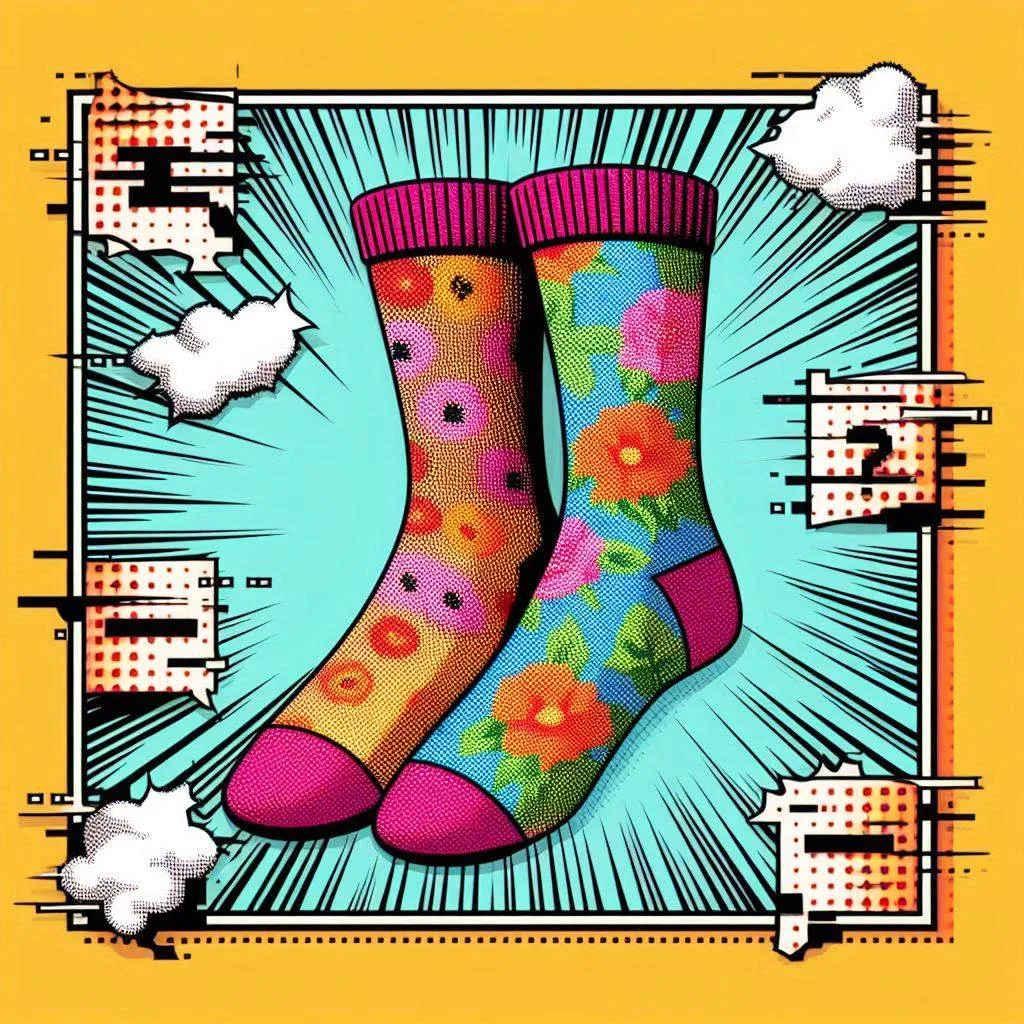
While it is not necessary to read about the previous methods before this one, it will give you some context about the sock images.. Anyway, back to the point: hiding data in plain sight, specifically by embedding it in images. Last time I explored how to embed data into an image using LSB (Least Significant Bit), which I really liked getting to work. It is a method of truly hiding and embedding data into an image, but has the following downsides:
It (somewhat) changes up an image and its entropy.
The bigger the message, the bigger the image needed.
So, keeping the above in mind I went looking for a different method of embedding data into images. I learned that a simpler method exists, using ancillary chunks in PNG images. PNG images contain all kinds of chunks, of which not all are directly related to the actual image data. Critical chunks are used to decode the actual image, ancillary chunks contain metadata and other optional data.
In the documentation, two of the ancillary chunk types are described as containing textual data:
zTXt: Compressed textual data.
iTXt: International textual data.
However, most software and decoders just ignore unknown or undefined ancillary chunks. So, instead of using an intended chunk type, I’ve chosen to add a new one called “pAMP”. Before reviewing how this can be done using Python, lets take a look at a small demo. The following image uses an undefined ancillary chunk to hide a secret message. Using the script, example commands and key below, you should be able to extract it!
Can you?
Embedding Data
First things first, the plan! The easiest way to add a new chunk to a PNG image, is by adding it add the end of the file. To be able to do this, we need to figure out where last chunk actually ends. As stated in the RFC, the image ends at the IEND marker (without data), resulting in \x00\x00\x00\x00IEND.
Since we’re not using a chunk used for textual data, we can try to blend in more with the rest of the chunks. The payload (an array of bytes) is compressed using zlib.compress. This helps blending in by reducing the chunks footprint. After determining the data length, a PNG chunk is created by combining the length, the pAMP chunk type, the compressed data, and a 4-byte CRC checksum. The >I format tells struct.pack to encode the number as a 4-byte integer. The code then locates the end marker, splits the array, and recombines everything before writing the new image.
definject(path:str,out_path:str,payload:bytes):# Read the source file
withopen(path,"rb")asf:data=f.read()# Compress the payload using zlib
compressed=zlib.compress(payload)# Determine the actual payload length
length=struct.pack(">I",len(compressed))# Create the custom ancillary chunk
chunk=length+b"pAMP"+compressed+struct.pack(">I",binascii.crc32(b"pAMP"+compressed)&0xffffffff)# Find the IEND marker
iend_pos=data.rfind(b"\x00\x00\x00\x00IEND")# Recombine the data
newdata=data[:iend_pos]+chunk+data[iend_pos:]# Write the new file
withopen(out_path,"wb")asf:f.write(newdata)
Extracting Data
Extracting the data was relatively straightforward. After skipping the PNG signature, the code loops through the raw data looking for the custom type. For every chunk, the length is unpacked and the chunk type is extracted. If no type match is found, the length is added to the position and the loop continues. However, if a type match is found, the position and the length are used to extract the actual data from the chunk. Finally, the data is decompressed and returned.
defextract(path:str)->bytes:# Read the source file
withopen(path,"rb")asf:data=f.read()# Skip the signature
position=8# Continue while there's data left
whileposition+8<=len(data):# Extract the data length
length=struct.unpack(">I",data[position:position+4])[0]# Verify target type
ifdata[position+4:position+8]==b"pAMP":# Extract and decompress the data
returnzlib.decompress(data[position+8:position+8+length]).decode()# No match, continue to next position (4+8+length)
position=position+12+lengthraiseKeyError(f"pAMP chunk not found")
Full Proof Of Concept
Unlike in part one and two, where I used a mock webshop to demonstrate, I decided to skip that this time and focus on a basic CLI tool. In addition to what was described above, the tool also converts images to PNG using Pillow if needed. It can embed either a string or file into the target image and encrypts the data before compressing it.
importstruct,zlib,binascii,os,argparsefromcryptography.fernetimportFernetfromPILimportImageclassHidingInPlainSightThree:def__init__(self,key,chunk_type:bytes=b"pAMP"):assertlen(chunk_type)==4,f"[!] Chunk type {chunk_type.decode()} must be 4 bytes long"self.__fernet=Fernet(key)self.__chunk_type=chunk_typedefconvert(self,path:str,out_path:str):""" Convert a given image to PNG """assertos.path.exists(path),f"[!] {path} does not exist"image=Image.open(path)image.save(out_path,'PNG')print(f"[!] Created: {out_path}")definject(self,path:str,out_path:str,payload:bytes):""" Create the pAMP ancillary chunk and inject the payload into it. Writes the image to given location. """assertos.path.exists(path),f"[!] {path} does not exist"withopen(path,"rb")asf:data=f.read()assertdata.startswith(b"\x89PNG\r\n\x1a\n"),"[!] File is not a PNG"compressed=zlib.compress(self.__fernet.encrypt(payload))length=struct.pack(">I",len(compressed))chunk=length+self.__chunk_type+compressed+struct.pack(">I",binascii.crc32(self.__chunk_type+compressed)&0xffffffff)iend_pos=data.rfind(b"\x00\x00\x00\x00IEND")assertiend_pos!=-1,"IEND not found"newdata=data[:iend_pos]+chunk+data[iend_pos:]withopen(out_path,"wb")asf:f.write(newdata)defextract(self,path:str,out_path:str)->bytes:""" Attempt to extract data from the ancillary chunk type pAMP. """assertos.path.exists(path),f"[!] {path} does not exist"withopen(path,"rb")asf:data=f.read()position=8whileposition+8<=len(data):length=struct.unpack(">I",data[position:position+4])[0]ifdata[position+4:position+8]==self.__chunk_type:result=self.__fernet.decrypt(zlib.decompress(data[position+8:position+8+length]))ifout_path:withopen(out_path,"wb")asf:f.write(result)returnprint(f"[+] Written result to {out_path}")returnprint(f"[i] Extracted data: \n{result.decode()}")position=position+12+lengthraiseKeyError(f"{self.__chunk_type.decode()} chunk not found")if__name__=="__main__":parser=argparse.ArgumentParser()parser.add_argument('--in-file','-f',required=True)parser.add_argument('--out-file','-o',required=False)parser.add_argument('--key','-k',type=str,required=False)# Add either a file or string to embed
secret_group=parser.add_mutually_exclusive_group()secret_group.add_argument('--secret','-s',type=str,required=False)secret_group.add_argument('--secret-file','-S',type=str,required=False)# Select an action (inject, extract or convert)
action_group=parser.add_mutually_exclusive_group()action_group.add_argument('--inject','-i',action='store_true')action_group.add_argument('--extract','-e',action='store_true')action_group.add_argument('--convert','-c',action='store_true')args=parser.parse_args()assertargs.injectorargs.extractorargs.convert,"[!] Add an action flag (--inject, --extract or --convert flag)"ifargs.inject:assertargs.out_file,"[!] Specify an output file"assertargs.secretorargs.secret_file,"[!] Specify a secret to embed"key=args.keyifnotkey:key=Fernet.generate_key()print(f"[i] Generated key: {key.decode()}")hips3=HidingInPlainSightThree(key)ifargs.secret:hips3.inject(args.in_file,args.out_file,args.secret.encode())elifargs.secret_file:assertos.path.exists(args.secret_file),f"[!] {args.secret_file} does not exist"withopen(args.secret_file,"rb")asf:hips3.inject(args.in_file,args.out_file,f.read())elifargs.extract:assertargs.key,"[!] A key is required"hips3=HidingInPlainSightThree(args.key)hips3.extract(args.in_file,args.out_file)elifargs.convert:assertargs.out_file,"[!] Specify an output file"hips3=HidingInPlainSightThree(Fernet.generate_key())hips3.convert(args.in_file,args.out_file)
Using the tool is fairly straightforward, as demonstrated with below examples:
# Converting an image to PNG:
python3 hips3.py --convert--in-file img/socks-1.jpg --out-file _test.png
# Injecting secret data into an image:
python3 hips3.py --inject--in-file img/socks-1.jpg --secret"My secret"--out-file embedded.png
# Or don't let it generate a new key:
python3 hips3.py --inject--in-file img/socks-1.jpg --secret"My secret"--out-file embedded.png --keyaPZxDRCY1aNURY5pacCszP_aBwR2EQAUm_nEIYakr80=# Extracting secret data from an image:
python3 hips3.py --extract--in-file embedded.png --keyaPZxDRCY1aNURY5pacCszP_aBwR2EQAUm_nEIYakr80=# Embed another file inside an image:
python3 hips3.py --inject--in-file img/socks-1.png --secret-file img/socks-2.png --out-file embedded.png --keyaPZxDRCY1aNURY5pacCszP_aBwR2EQAUm_nEIYakr80=# Extract a file from an image:
python3 hips3.py --extract--in-file embedded.png --out-file out.png --keyaPZxDRCY1aNURY5pacCszP_aBwR2EQAUm_nEIYakr80=
Detection And Analysis
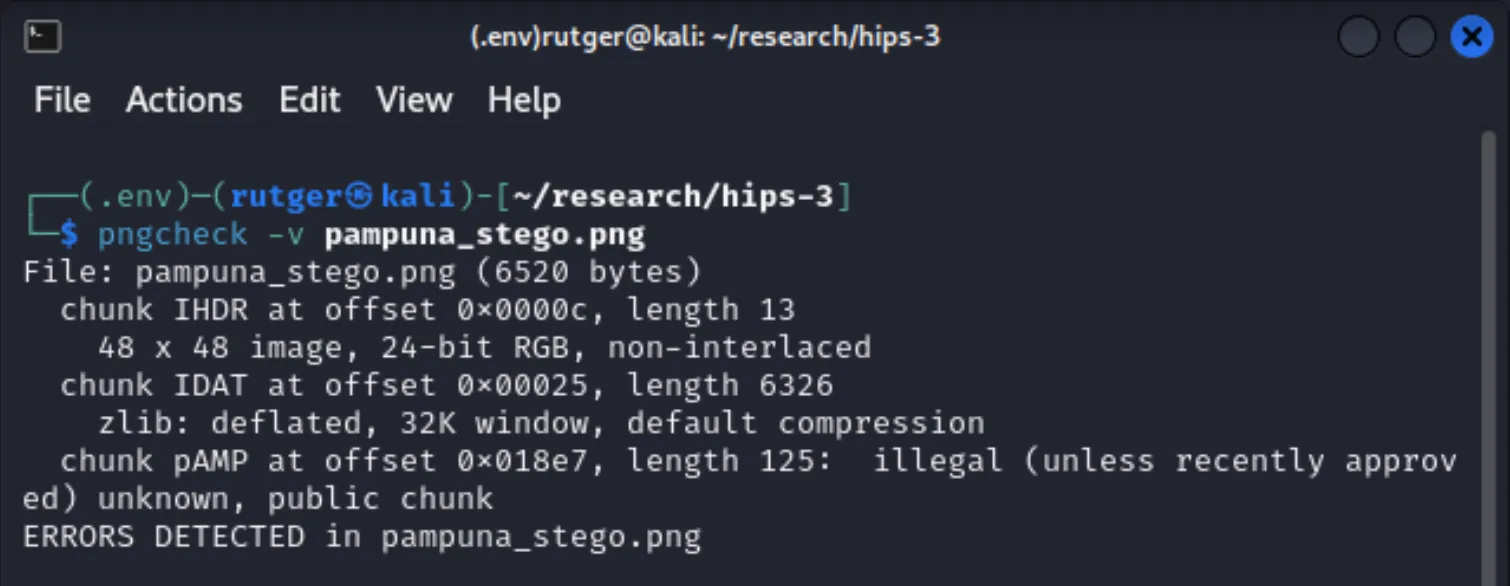
So, what can be done to detect this? Well, because I chose to use an undefined ancillary chunk, that would be the first place to look. The use of unknown chunks is suspicious and could be a good reason to analyse an image further. The integrity of PNG images can easily be verified using pngcheck. Use the tool by simply running:
pngcheck -v example.png
If an unknown chunk is detected, you’ll see something like “chunk [CHUNK] at offset [OFFSET], length [LENGTH]: illegal (unless recently approved) unknown, public chunk”.
Running pngcheck
So looking for unknow chunks can be a good indicator, but what else can we do? In theory, these chunks can be used to hide a lot of data. Unlike the previously discussed method LSB (Least Significant Bit) method, the data can actually be larger than the image it is embedded in. Keeping this in mind, I figured a method of detecting hidden data could consist of:
Looking for unknown ancillary chunks.
Estimating an expected image size based on the image resolution.
Determining if the file is unexpectedly large or ancillary chunks are relatively large compared to the image data.
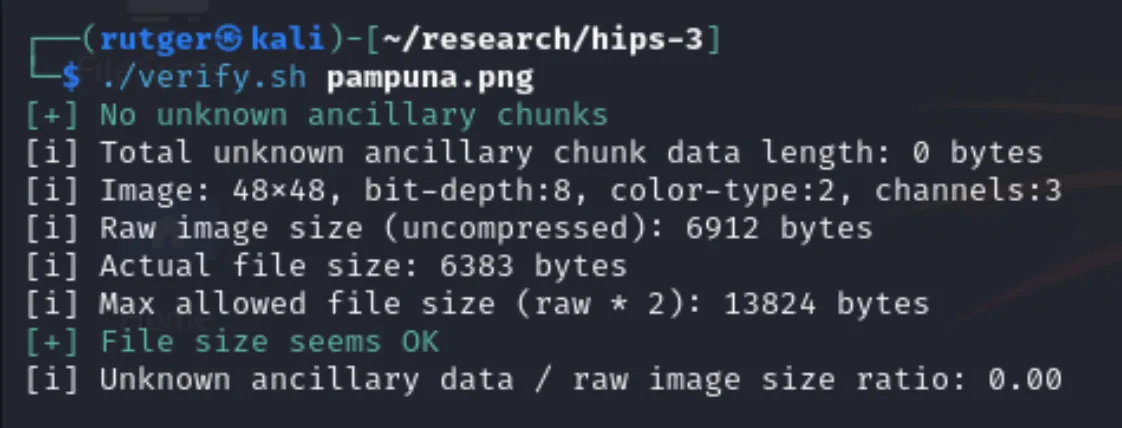
By any means, this is not a method covering everything. The main challenge is that PNG images contain compressed data and estimating the “true” image size is just that, an estimate. Keeping that in mind, I created a bash script which looks for unknown chunks and attempts to compare chunk size to the estimated image size. The unknown chunk is a strong indicator something phishy is going on.
First things first, lets run the verification script on a clean PNG image:
Running verification script on a clean image
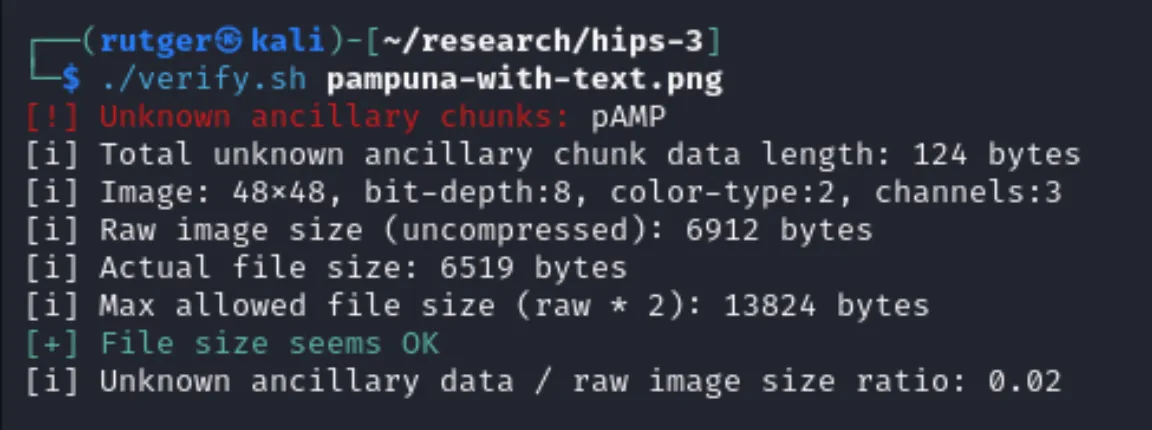
Next up, an image containing an encrypted string. This does not impact the file size that much at all, but at least the custom ancillary chunk is detected. Again, this suggests something weird is going on with the image and merits further investigation.
Running verification script on an image containing encrypted text
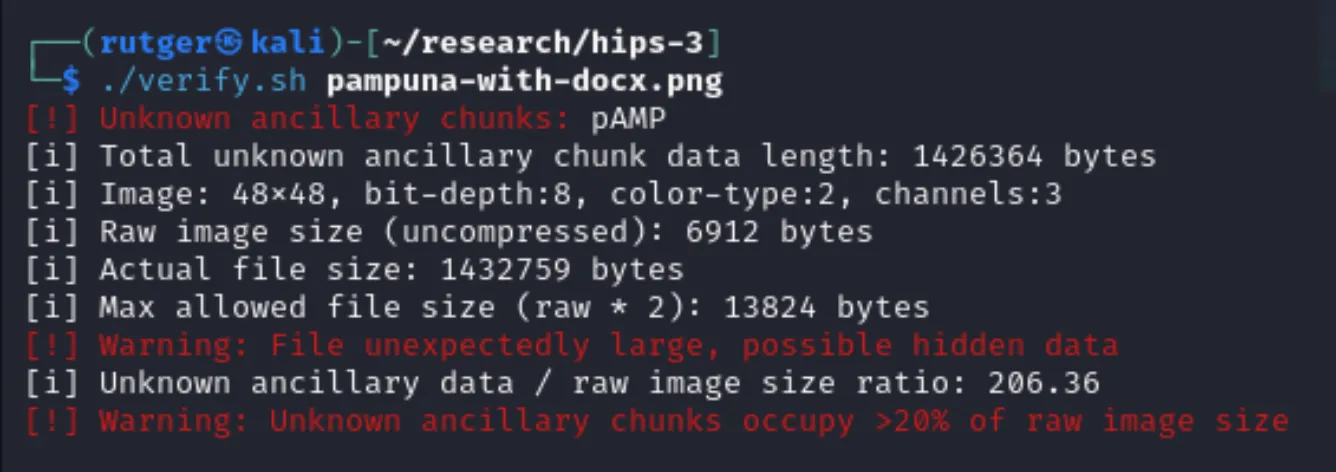
Detecting an embedded file was a bit harder. As mentioned, the image size is estimated based on the resolution. This means that we’re working with a range of potential sizes. For example, a compressed 1000x1000 entirely white PNG image is considerably smaller than an image containing many colors. This means that a small file hidden within a file that uses efficient compression is harder to detect than one hidden in a larger file with inefficient compression.
To prove the detection scenario, I’ve embedded a regular sized docx file within the same image. Because the added ancillary chunk is relatively large compared to the image data, the scripts reports something is probably wrong with the image.
Running verification script on an image containing an encrypted file
If you’re interested in the detection script, you can take a look at it in this repository.