Goal
Learn how to set up a customizable Python tool which you can use to scan for Cross-Site Scripting vulnerabilities using patterns searches.
Audience
Penetration Testers
Disclaimer
This article is written for educational purposes and is intended only for legal penetration testing and red teaming activities, where explicit permission has been granted. If you wish to test any of the scripts provided, refer to the disclaimer.
Even with excellent tools available, I often find myself enjoying the process of building my own (simplified) alternatives. There are several good reasons to consider creating your own tools:
Knowledge: Exploring a subject, like XSS, learning how it works and detect it.
Complete control: You know and control what a tool does by heart. This becomes very relevant when testing in a bug bounty program.
Reduced dependency: With enough time, you can minimize or avoid using 3rd party packages.
Good ol’ fun: I like building my own stuff.
When building tools for web testing, my language of choice is Python. Although I have a background in .NET, I love the syntax and simplicity of the language.
In this article, I want to explore building a basic pattern-based XSS reconnaissance tool. Just a quick heads-up, if you don’t like reading Python code, maybe skip this one!
First Things First - Cross-Site Scripting
For a quick refresher on XSS, lets just review Wikipedia:
Cross-site scripting (XSS) is a type of security vulnerability that can be found in some web applications. XSS attacks enable attackers to inject client-side scripts into web pages viewed by other users. A cross-site scripting vulnerability may be used by attackers to bypass access controls such as the same-origin policy.
Not So Passive, Not So Active
Just to be clear about the goal here, while this tool can’t be classified as passive, I want to avoid automated interaction with the target as much as possible. As stated before, when testing in a bug bounty program, I want to know and control my toolset. I want tools which to give me information on which I can act on myself, but avoid spraying payloads at the target.
What this tool does:
Follow links within the target domain.
Find query strings and display them.
Find forms and display them.
Extract scripts, in-line or by source (within the targets domain or subdomain).
Analyse JavaScript using regular expressions.
What this tool does not do:
Attempt to submit any form.
Inject any payload at any point.
That being said, it would not be cost much effort to inject something like a XSS polyglot into the insertion points mentioned above to test for XSS. If you want something like this, I would recommend using an existing tool.
To PIP Or Not To PIP
Avoiding dependencies and packages has some benefits, but also (obvious) major drawbacks.
Without 3rd party packages, you are in full control. Your Python code can run almost anywhere (for example, restricted environments) and there’s no upkeep or introduced risk by 3rd party code.
On the flip side, you will have to build everything yourself. I would never recommend doing this for any “deployed” or production-like code, because you will certainly introduce your own risks.
However, for experimental tools like these, I try to at least minimize dependencies. But in this case, I’ve avoided using any at all. Which introduced some challenges:
Making web requests. Normally using requests would solve all my problems. Back to urllib I guess.
Parsing HTML. Again, a package like bs4 handles this perfectly. Avoiding this required writing an extended HTMLParser.
Logging. I need to be able to see what is happening when the tool is running.
Finally, we’re getting to the first piece of code. Don’t worry, there’s plenty more code coming your way.
The following class provides basic logging functionality with colored output and support for debug prints.
# Note: I've omitted most logging functions for brevity.
fromenumimportEnumclassColor(Enum):GREEN='\033[32m'MAGENTA='\033[35m'RESET='\033[0m'classLogger:debug_active:bool=False@staticmethoddefcprint(color=Color.RESET,prefix:str="[?] ",*text:str)->None:parts=[str(part)forpartintext]print(f"{color.value}{prefix}{str.join('\n\t',parts)}{Color.RESET.value}")@staticmethoddefsuccess(*text:str)->None:Logger.cprint(Color.GREEN,"[+] ",*text)@staticmethoddefdebug(*text:str)->None:ifLogger.debug_active:Logger.cprint(Color.MAGENTA,"[~] ",*text)
Parsing HTML
We’ve reached the second objective! The tool needs to be able to parse HTML and extract information. This is done by extending the HTMLParser class and implementing the handle_starttag and handle_data functions.
To extract the information I need, the following handlers were added:
__handle_anchor: Extract links from anchor (a) tags.
__handle_script: Extract either referenced scripts or script contents.
__handle_form: Extract form info (action, method).
__handle_input: Extract form fields (inputs).
fromhtml.parserimportHTMLParserclassCustomHTMLParser(HTMLParser):def__init__(self):super().__init__()self.links=set()self.js_files=set()self.inline_scripts=[]self.forms=[]self.__mapping={'a':self.__handle_anchor,'script':self.__handle_script,'form':self.__handle_form,'input':self.__handle_input,}defhandle_starttag(self,tag,attrs):handler=self.__mapping.get(tag)ifhandler:handler(attrs)defhandle_data(self,data):""" Store data to the last added inline script block. """ifself.inline_scripts:self.inline_scripts[-1]+=datadef__handle_input(self,attrs):input_data={}forattrinattrs:ifattr[0]in['name','value','type','id']:input_data[attr[0]]=attr[1]if'name'ininput_data:self.forms[-1]['inputs'].append(input_data['name'])self.forms[-1][input_data['name']]=input_data.get('value','')def__handle_form(self,attrs):form_data={'method':'get','action':'','inputs':[]}forattrinattrs:ifattr[0]in['action','method']:form_data[attr[0]]=attr[1]self.forms.append(form_data)def__handle_script(self,attrs):forattrinattrs:ifattr[0]=='src':self.js_files.add(attr[1])breakelse:inline_script=''self.inline_scripts.append(inline_script)def__handle_anchor(self,attrs):forattrinattrs:ifattr[0]=='href':self.links.add(attr[1])break
Recognizing Patterns
The tool outputs static matches like links and forms, but to take it a step further, it should also look for certain patterns or even bad practices in JavaScript.
This will be done using regular expressions, for example:
The list above contains basic examples, but with a little love and attention to detail, they can serve as great starting points for spotting potential XSS vulnerabilities. For example, practices like using eval are almost always red flags.
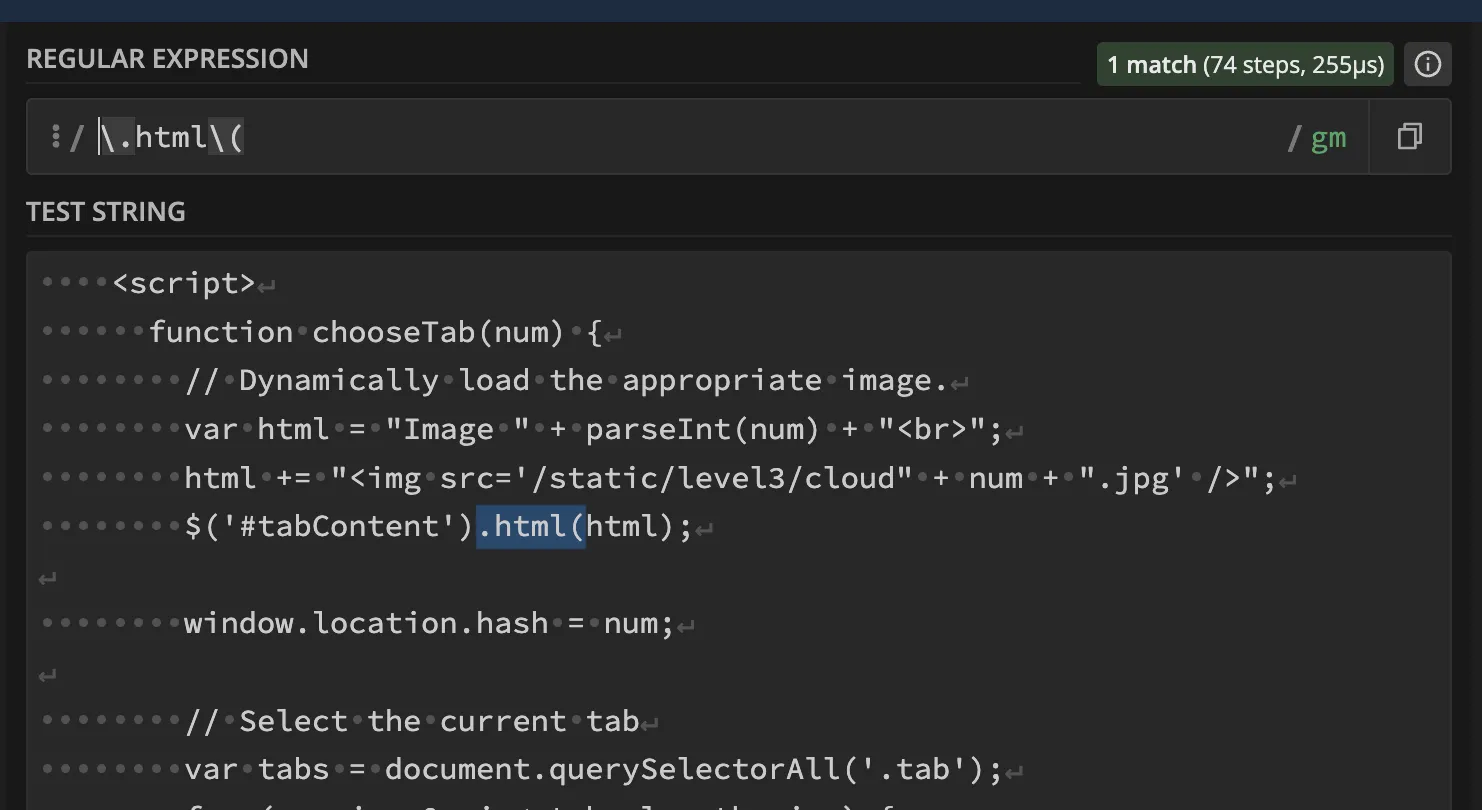
Just to visualize this, here’s a practical example, analyzing JavaScript with regex101:
Demonstrating a basic regex match using regex101
Crawl Away
The main class of this tool borders on what seems fitting for a blog post. I’ve shrunk it down a bit and moved content handling functions to the end of the post.
When implementing an alike tool, you may want to deflate the code a bit and add some more debug statements.
That being said, the Scanner class does the following:
__check_unsafe_js: Search for patterns in crawled JavaScript.
I’ve omitted the implementations of the following functions and added them at the end of the post:
__is_within_domain: Verify a new target is with the scope.
__read_response: Unzip and read response contents.
__handle_*: Several functions that handle crawled results.
frombin.html_parserimportCustomHTMLParserfrombin.loggerimportLoggerfromurllib.parseimporturljoin,urlparseimporturllib.request,re,threading,queue,time,gzipclassScanner:def__init__(self,patterns:list,base_url:str,user_agent:str):self.__visited,self.__js_files,self.__js_origins,self.__query_strings=set(),set(),set(),set()self.__js_origins,self.__to_visit,self.__stop_event=dict(),queue.Queue(),threading.Event()self.__patterns=patternsself.__base_url=base_urlself.__headers={'User-Agent':user_agent}self.__to_visit.put(base_url)defsetup(self,sleep_interval:int=1,num_threads:int=10,crawl:bool=False):""" Thread and interrupt handler. """threads=[]for_inrange(num_threads):thread=threading.Thread(target=self.__work,args=[sleep_interval,crawl])thread.start()threads.append(thread)try:forthreadinthreads:thread.join()exceptKeyboardInterrupt:self.__stop_event.set()Logger.warning('Aborting remaining threads...')forthreadinthreads:thread.join()def__work(self,sleep_interval:int,crawl:bool):""" Thread worker. Fetches from the queue and handles crawl results. """whilenotself.__stop_event.is_set()andnotself.__to_visit.empty():try:url=self.__to_visit.get(timeout=1)ifurl.rstrip('/')inself.__visited:continueself.__visited.add(url)Logger.info(f"Crawling {url}")try:withurllib.request.urlopen(urllib.request.Request(url,headers=self.__headers))asresponse:ifnot'text/html'inresponse.headers.get('Content-Type',''):continue# Parse the fetched page
html_content=self.__read_response(response)parser=CustomHTMLParser()parser.feed(html_content)parser.close()# After parsing, handle the crawled contents
self.__handle_links(url,crawl,parser.links)self.__handle_inline_scripts(url,parser.inline_scripts)self.__handle_referenced_scripts(url,parser.js_files)self.__handle_forms(url,parser.forms)exceptExceptionase:Logger.error(f"Error crawling {url}:",e)time.sleep(sleep_interval)self.__to_visit.task_done()exceptqueue.Empty:continuedef__check_unsafe_js(self,js_content)->tuple:""" Use regex to search for unsafe patterns in the given JavaScript content. """forpatterninself.__patterns:ifre.search(pattern,js_content,re.IGNORECASE):return (True,re.findall(pattern,js_content))return (False,None)# Snipped. See the end of the post for the omitted functions
Analyzing Referenced Scripts
The last thing which the scanner is responsible for is handling referenced script files. The existing function __check_unsafe_js handles the pattern matching, but the JavaScript files still need to be fetched. The following function loops through the referenced files, fetches them and lets us know when a potential bad pattern has been found.
# class Scanner, continued
defanalyze_js_files(self,sleep_interval:int=1):""" Fetch JavaScript files and analyze their contents. """forjs_fileinself.__js_files:try:Logger.debug(f"Fetching referenced script: {js_file}")withurllib.request.urlopen(urllib.request.Request(js_file,headers=self.__headers))asresponse:js_content=self.__read_response(response)(match,pattern)=self.__check_unsafe_js(js_content)ifmatch:Logger.success('Found potentially unsafe JavaScript in referenced file:',js_file,*list(set(pattern)),'\n\tThis file is referenced at:',*self.__js_origins[js_file])exceptExceptionase:Logger.error('Error analyzing referenced JavaScript file:',js_file,e)finally:time.sleep(sleep_interval)
Wrapping It Up
Okay, so we’ve arrived at the final piece of the puzzle. Arguments! Like anyone, I like being able to control CLI tools without changing my code. I’ve used argparse to offer some customization before running, like:
Crawling or scanning a single page.
Show debug prints or keep a clean output.
Override the user agent (may come in handy for bug bounties).
Threading and delaying options.
frombin.xss_scannerimportScannerfrombin.loggerimportLoggerimportargparseif__name__=="__main__":parser=argparse.ArgumentParser()parser.add_argument('-t','--target',required=True,type=str)parser.add_argument('-c','--crawl',nargs='?',default=False,type=bool)parser.add_argument('-d','--debug',nargs='?',default=False,type=bool)parser.add_argument('-s','--sleep',nargs='?',default=1,type=int)parser.add_argument('-w','--workers',nargs='?',default=10,type=int)parser.add_argument('-x','--patterns',nargs='?',default='./data/patterns',type=str)parser.add_argument('-u','--user-agent',nargs='?',default='Mozilla/5.0 (Windows NT 10.0; Win64; x64) AppleWebKit/537.36 (KHTML, like Gecko) Chrome/131.0.0.0 Safari/537.3',type=str)args=parser.parse_args()withopen(args.patterns,'r',encoding='utf8')aspatterns:patterns=patterns.readlines()Logger.debug_active=args.debugscanner=Scanner(patterns,args.target,args.user_agent)scanner.setup(args.sleep,args.workers,args.crawl)scanner.analyze_js_files(args.sleep)
Testing It Out
Let’s get started! I found some XSS exercises and tested the tool on them. As expected, it doesn’t cover all edge cases, and incorporating more detailed patterns could improve the results. Another useful addition would be printing hashtag (#) values in URLs, as these are often used to scroll the page or dynamically change content.
That being said, the tool did point me in the right direction and helped me analyze the exercises quickly. I’m excited to test this tool during an upcoming engagement after finetuning the patterns a bit more!
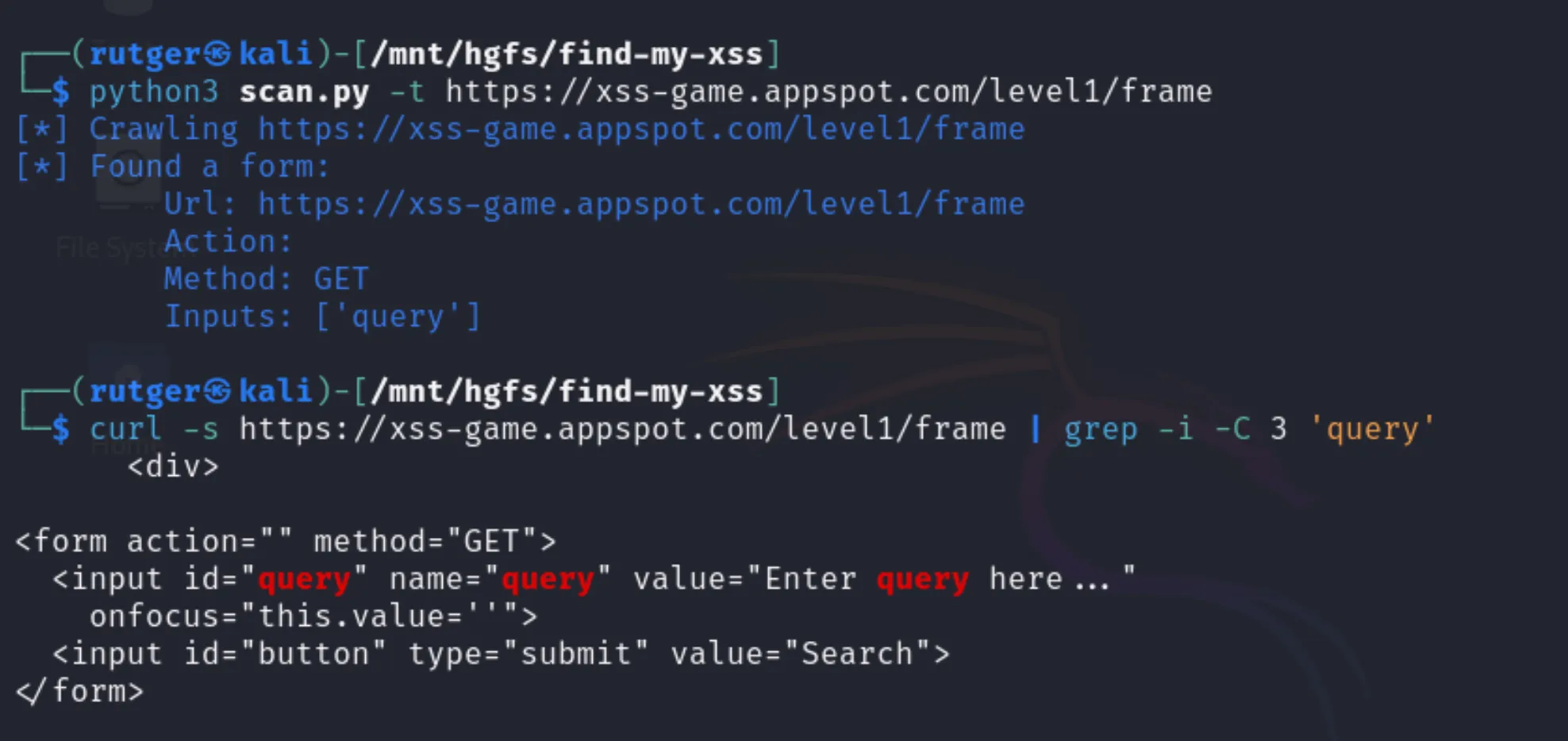
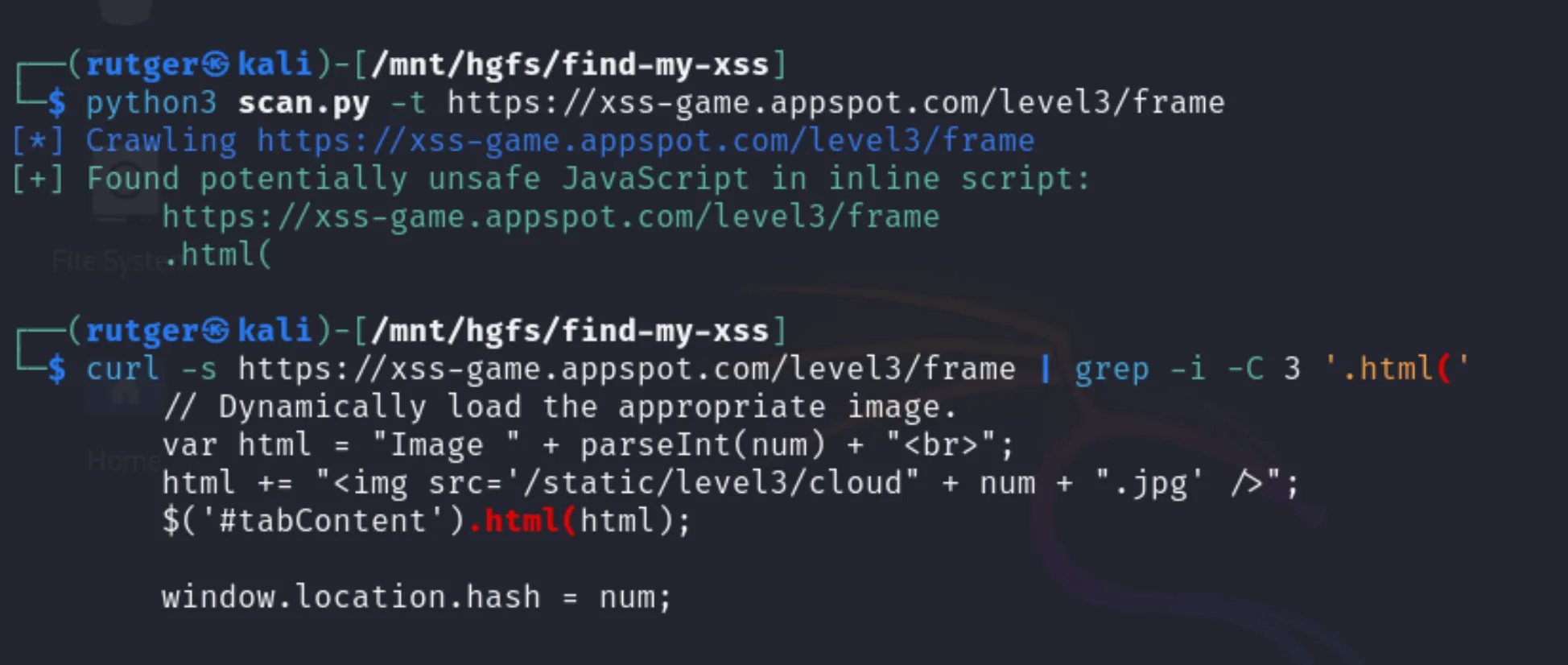
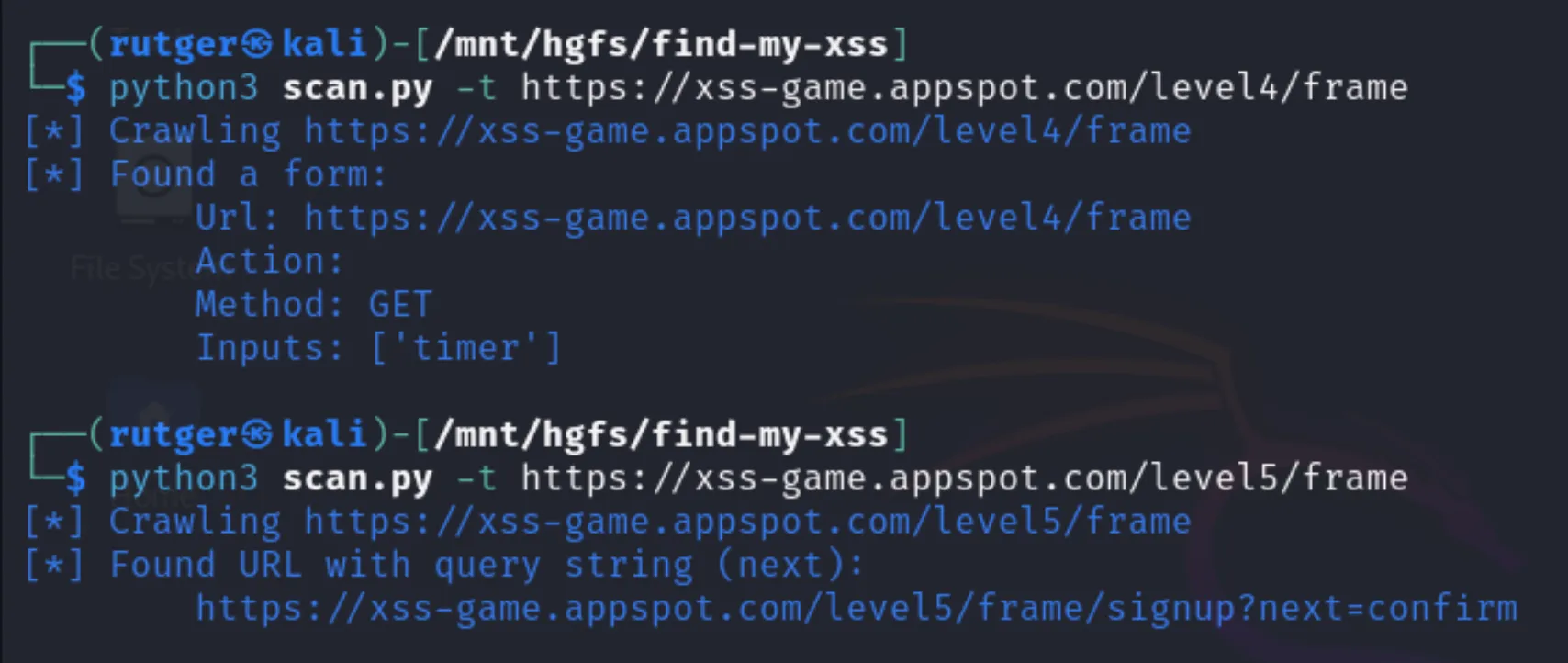
The XSS game I’ve looked at is created by Google. I’ve walked through the games, and in 4 out of 6 games the tool pointed me in the right direction. The other 2 games relied on the mentioned hashtag.
Finding a form with an inputFinding a match in an inline scriptFinding another form and a query string
Snipped Code
As promised, the following code block contains the missing functions mentioned in the Scanner class:
# class Scanner, continued
def__is_within_domain(self,url,sub_allowed=False):""" Verify if the domain matches the base domain. Optionally allows subdomains. """base_domain=urlparse(self.__base_url).netloctarget_domain=urlparse(url).netlocreturntarget_domain==base_domainor(sub_allowedandtarget_domain.endswith(f".{base_domain}"))def__read_response(self,response)->str:""" Read the response, unzip if needed. Return the decode response. """content=response.read()ifresponse.info().get('Content-Encoding')=='gzip':returngzip.decompress(content).decode('utf-8')returncontent.decode('utf-8')def__handle_links(self,url,crawl,links):""" Determine if a link should be crawled. If so, add it to the queue """forlinkinlinks:full_url=urljoin(url,link)self.__handle_query(full_url)ifcrawlandself.__is_within_domain(full_url):self.__to_visit.put(full_url)def__handle_query(self,url):""" Print query string. Needs to be tested and deduplicated. """parsed_url=urlparse(url)ifparsed_url.queryandself.__is_within_domain(url,sub_allowed=True)andnotparsed_urlinself.__query_strings:self.__query_strings.add(parsed_url)query_params=urllib.parse.parse_qs(parsed_url.query)Logger.info(f"Found URL with query string ({str.join(', ',query_params)}):",url)def__handle_forms(self,base_url,form):""" Print forms as informative """forforminform:Logger.info('Found a form:',f"Url: {base_url}",f"Action: {form['action']}",f"Method: {form['method']}",f"Inputs: {form['inputs']}")def__handle_inline_scripts(self,url:str,inline_scripts:list):""" Walk through script tags without a src attribute """forinline_scriptininline_scripts:(match,pattern)=self.__check_unsafe_js(inline_script)ifmatch:Logger.success('Found potentially unsafe JavaScript in inline script:',url,*list(set(pattern)))def__handle_referenced_scripts(self,url:str,referenced_scripts:list):""" Walk through script tags with a src attribute. Store the links. """forjs_fileinreferenced_scripts:full_url=urljoin(url,js_file)ifself.__is_within_domain(full_url,sub_allowed=True):self.__js_files.add(full_url)# Store the link between the URL fetched and the JS file
self.__js_origins.setdefault(full_url,[]).append(url)else:Logger.debug(f"Ignoring external referenced script: {full_url}")